
Twilio concurrent calls limit: how Business Profile approval lifts it
Aniket SinghGuides8 min readUpdated

The Twilio concurrent calls limit depends on your account type and on whether Twilio has approved your primary profile in Trust Hub. For accounts upgraded from trial on or after 3 February 2026, Twilio allows 2 concurrent calls with no approved profile, 3 with an approved Individual profile, and no concurrency limit once a Business profile is approved. Trial accounts get 5. Accounts upgraded before that date are, in Twilio's words, "unaffected at this time".
Those figures come from Twilio's own help article on call concurrency, checked on 2026-10-29. This guide explains what counts as a concurrent call, how the limit differs from calls per second, what Twilio's profile names mean, how to submit a Business profile, and what you'll see if you run BookifyCall on your own Twilio account. Where Twilio doesn't say something, we mark our advice as general guidance.
Key takeaways
- The limit counts every live call on the account at once, inbound and outbound together.
- Without an approved profile, a recently upgraded account can have only 2 calls live. An approved Business profile removes the concurrency limit.
- Concurrency is not the same as calls per second (CPS). By default Twilio starts 1 outgoing call per second.
- Twilio now calls the profile a "Primary Compliance Profile". Older pages say Primary Customer Profile or Business Profile. They mean the same thing.
- Submit it in the Twilio Console under Communications → Trust Hub → Profiles, as a Business Profile.
Twilio concurrent calls limits in one table
Twilio publishes these limits per account type. The note above the table in Twilio's article says they apply to accounts upgraded from trial on or after 3 February 2026.
| Account type | Programmable Voice limit | Elastic SIP Trunking limit |
|---|---|---|
| Trial | 5 | 4 |
| No approved primary profile | 2 | 2 |
| Approved Individual profile | 3 | 3 |
| Approved Business profile | Unlimited | Unlimited |
Source: Twilio Help Center, "How Fast Can I Place or Receive Phone Calls with Twilio?", checked on 2026-10-29. Twilio changes these rules from time to time, so check the article before you plan around them.
Two details matter. First, the date rule: an account upgraded before 3 February 2026 isn't affected by the new limits "at this time". Second, an Individual profile isn't enough to lift the limit. Twilio says newly upgraded accounts need an approved Business profile for unlimited concurrency.
What counts as a concurrent call
Twilio defines call concurrency as the total number of active, simultaneous voice calls on an account at any given moment, incoming and outgoing together. So the limit isn't per phone number. It's everything live on the account, added together.
In practice, any setup that dials a second phone while the first call is still live uses two calls. The caller's inbound call is one; the outbound call to the person you're connecting them to is another. That's our general guidance from how Twilio defines concurrency, not a list Twilio publishes. It's why call forwarding, transfers and "ring my team first" routing can reach a 2-call limit faster than you'd expect.
What happens when you hit the limit
Twilio rejects the new call with error 10004, "Call concurrency limit exceeded". Twilio lists the likely causes as a trial account at its limit, an upgraded account without an approved primary profile, or another Twilio-defined limit. Its suggested fixes are to upgrade from trial, submit a primary profile in Trust Hub, or contact Twilio if you need more capacity.
Concurrency vs calls per second
People often mix these up, and Twilio has a help article on exactly that. Concurrency is how many calls are live at once. Calls per second (CPS) is how fast new outgoing calls can start.
- By default each Twilio account can start 1 outgoing call per second. Outgoing API calls above that rate are queued, not dropped, and run as capacity frees up.
- You can raise CPS yourself in the Twilio Console, but Twilio says that self-serve option is currently only for accounts with an approved Business profile. With an Individual profile, CPS stays at 1.
- CPS mainly affects outbound calling. For a receptionist that mostly answers inbound calls, concurrency is usually the limit you'll notice first.
Business Profile, Primary Customer Profile, Primary Compliance Profile: one thing, three names
Twilio has renamed this profile over time, which makes searching for help confusing. Its developer docs now note that customer profiles "have been rebranded to Compliance profiles", without any change to the API. A Twilio help article refers to the "Primary Compliance Profile (previously called Primary Customer/Business Profile)".
Whatever the name, the primary profile is the record of who owns the account. It comes in two types:
- Business Profile: for businesses with verified business documentation. This is the one that removes the concurrency limit.
- Individual Profile: for sole proprietors or individuals exploring Twilio. It asks for a government ID and a selfie, and lifts the limit only to 3 concurrent calls.
How to submit a Business Profile in Trust Hub
Twilio's help article "How do I create my primary compliance profile?" gives these steps in the Twilio Console:
- Select Communications in the left sidebar, then Trust Hub, then Profiles.
- On Create your primary compliance profile, select Get started. What will I need? shows the full checklist.
- On Select profile type, choose Business Profile.
- Fill in the details. For a business these include the profile friendly name, an authorized representative, the address, your legal business name, business identity, business registration ID type and number, business website URL, a social media profile URL and a notifications email.
- Submit the profile.
A few points from Twilio's documentation worth knowing before you start:
- The primary profile lives on the main (parent) account. A subaccount shows the parent's profile read-only.
- If you leave the form part-way, it's saved as a Draft and you can pick it up again with Complete profile.
- Twilio sends review updates to the notifications email you enter, so use an inbox someone watches.
Profile statuses and how long review takes
According to Twilio's help article, after you submit, the status on the Profiles page moves from Draft to In review, then to Approved or Rejected. Twilio's developer docs use the names Pending Review, Twilio Approved and Twilio Rejected for the same stages. You can't edit a profile while it's in review. If it's rejected, you can edit it and resubmit; Twilio says a profile with missing or badly formatted data is rejected straight away.
Twilio also notes that approval means your data met Twilio's requirements. It isn't a judgement that you comply with any law.
How long does it take? Twilio's concurrency article doesn't give a review time. In its A2P 10DLC onboarding guide, Twilio says "it may take 72 hours or more" to approve a Customer Profile. Treat that as a rough guide, not a promise.
Avoiding a rejection (general guidance)
Twilio's only stated reason for an automatic rejection is missing or badly formatted data. Beyond that, these habits tend to help any business verification. This is our general guidance, not Twilio's list:
- Enter the legal business name exactly as it appears on your registration, not your trading name.
- Make sure the registration ID type and number match that legal name.
- Use a business website that is live and clearly belongs to the same business.
- Name an authorized representative who can answer if Twilio gets in touch.
What this means if you run BookifyCall on your own Twilio account
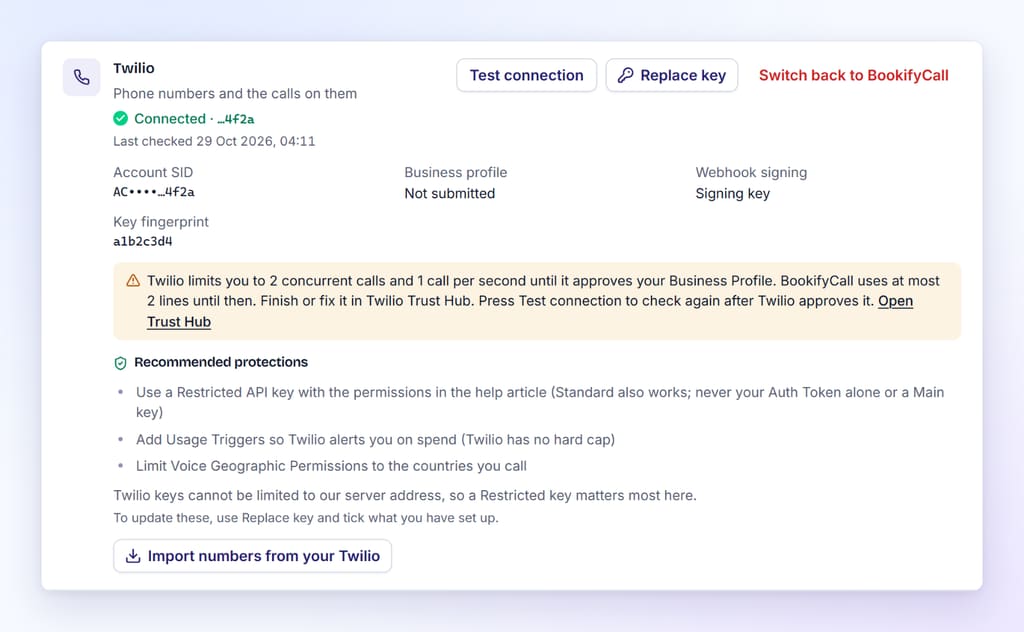
On the Enterprise plan you can connect your own Twilio account to BookifyCall. Your calls then run on, and are billed to, that account, so Twilio's limits apply to it. Here is what BookifyCall shows and does:
- At most 2 lines until approval. Until Twilio approves your Business profile, Twilio allows 2 calls at a time and 1 new call per second, and BookifyCall uses at most 2 lines on your account. Once it's approved, your plan's lines apply.
- The status on the card. In Settings → Your providers, the Twilio card shows Business profile as Approved, In review at Twilio, Not submitted, Rejected by Twilio or Unknown. Unknown means your key can't read Trust Hub; calls still work, with the 2-call limit.
- A link to Trust Hub. When the profile isn't approved, the card explains the limit and links to Open Trust Hub, so you can finish or fix the profile.
- Test connection. After Twilio approves the profile, press Test connection. The status updates straight away, and it's also rechecked every day.
Ring-first and the 2-call limit
If you use ring-first routing, where your team's phones ring before the AI answers, one caller can use two Twilio calls: the caller's call, plus the team phone that's ringing. On an account that isn't approved yet, that's the whole limit. A second caller can be blocked while your team's phone rings.
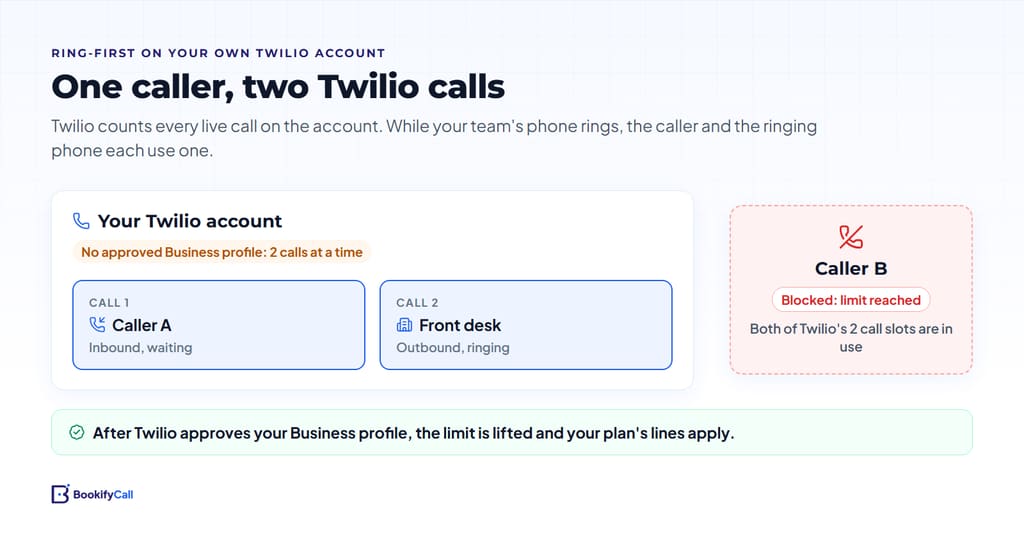
Until your profile is approved, you might prefer to let the AI answer first and use transfers only when a caller needs a person. Once Twilio approves the profile, the limit no longer applies and ring-first works as usual.
Frequently asked questions
Why can my Twilio account only handle 2 calls at once?
If your account was upgraded from trial on or after 3 February 2026 and has no approved primary profile, Twilio limits it to 2 concurrent calls. Submit a Business Profile in Trust Hub; once Twilio approves it, the concurrency limit is removed.
Do inbound calls count toward Twilio's concurrent call limit?
Yes. Twilio counts every active call on the account, incoming and outgoing together. A call that is forwarded or transferred to another phone can count twice while both parts are live.
My account was upgraded before February 2026. Am I affected?
According to Twilio, accounts upgraded before 3 February 2026 are "unaffected at this time". Twilio could change that, so a Business profile is still worth having.
How long does Twilio take to approve a Business Profile?
Twilio's concurrency article doesn't say. Its A2P 10DLC guide says approval "may take 72 hours or more". You'll get updates at the notifications email on the profile.
Is an Individual profile enough?
Not for unlimited calls. An approved Individual profile lifts the limit from 2 to 3 concurrent calls and keeps CPS at 1. Only an approved Business profile removes the concurrency limit.
What is Twilio error 10004?
It means "Call concurrency limit exceeded": a new call would go over the number of live calls your account allows. Upgrading from trial, getting a Business profile approved, or contacting Twilio for more capacity are Twilio's suggested fixes.
The 2-call limit is a short-term step for most businesses: submit the Business profile, wait for approval, then press Test connection. For the wider picture of running calls on your own accounts, see our guide to using your own Twilio, OpenAI and ElevenLabs accounts. The help center has the in-app details, and you can contact us if your card shows a status you don't expect.