
Small business call routing: ring your team first, then AI
Aniket SinghCall handling10 min readUpdated

Small business call routing comes down to one decision: who hears a new call first. For most small teams there are two good answers. Let the AI receptionist answer straight away and transfer the caller when a person is needed, or ring your own phones for a few seconds each and let the AI pick up only if nobody answers.
Both work. The right one depends on how many people you have, how often they can actually pick up, and how long you are willing to let a caller wait. This guide walks through each option, explains warm and cold transfers, and gives three example set-ups you can copy.
If you are new to the idea, start with our plain-English guide to what an AI receptionist is and how it handles calls, then come back here.
Key takeaways
- There are two main routing patterns for small teams: AI answers first and transfers, or your team's phones ring first and the AI answers if nobody does.
- Ring-first suits businesses where a person is usually free to answer. AI-first suits busy or solo businesses where a person is usually not.
- Keep total ring time short. Three phones at 15 seconds each already means a 45-second wait before anyone speaks.
- A "press 1 to take this call" step stops a personal voicemail from swallowing the call.
- Warm transfers brief your teammate before the caller joins. Cold transfers connect them straight away. Use warm for anything that needs context.
What small business call routing actually decides
Call routing is the set of rules that decides where a ringing call goes. Large companies use phone menus and queues. A small business usually needs something simpler: a short, predictable path that ends with the caller talking to someone who can help, whether that is a person or the AI.
With an AI receptionist in the picture, the routing choices look like this:
| Pattern | How it works | Best for | Watch out for |
|---|---|---|---|
| AI answers first, transfers when needed | The AI picks up at once, answers questions or books, and puts the caller through to a person for urgent or complex calls | Solo owners, busy shops, after-hours cover | Write clear transfer rules so the right calls reach a person |
| Ring your team first, then the AI | The call rings your own phones in order; if nobody takes it, the AI answers | Small offices where someone is usually at the desk | Long ring chains make callers wait |
| Carrier no-answer forwarding | Your phone company forwards unanswered or busy calls on your existing line to the AI's number | A single main line you want to keep answering yourself | Ring count is set by the carrier, not by you |
The third option is worth knowing about because it needs no change in the AI tool at all. Most carriers offer it. Verizon, for example, documents a no-answer/busy forwarding code that sends calls on after roughly three or four rings. The trade-off is control: you cannot pick which phones ring, in what order, or for how long.
How ring-first works: your team, then the AI
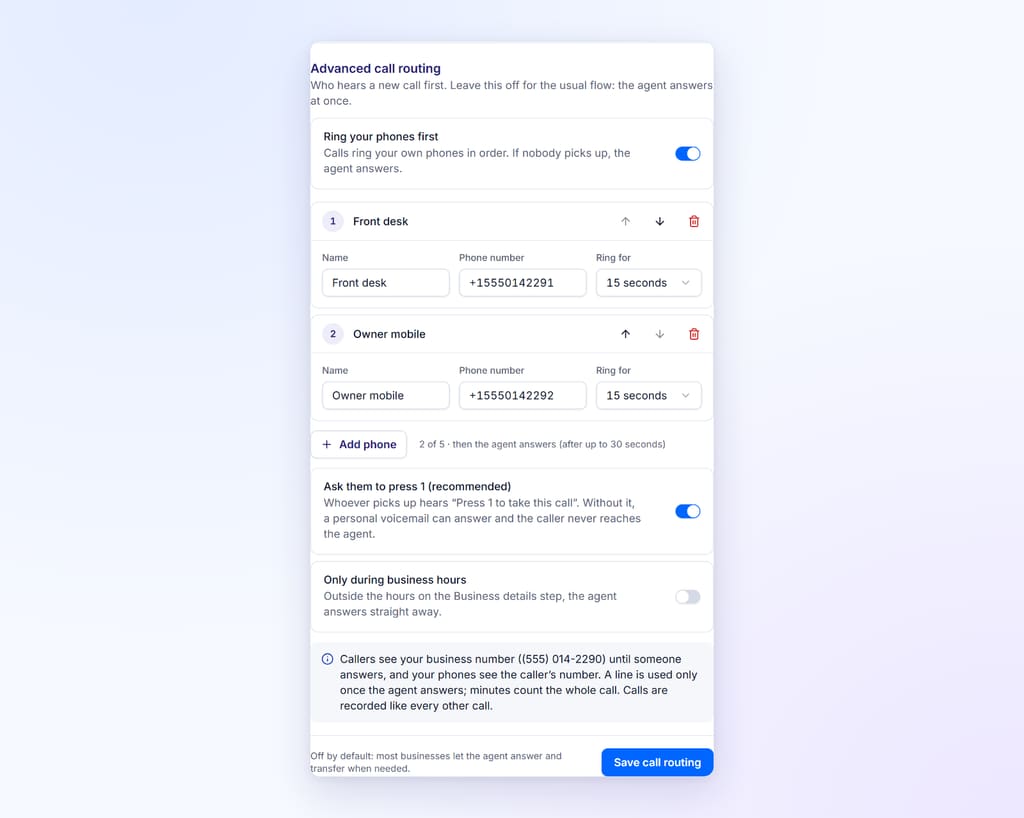
Ring-first is a built-in, optional setting in BookifyCall, set per agent. When it is on, an inbound call rings up to five of your own phones, one after another. Whoever answers gets the caller. If nobody does, the AI answers as usual.
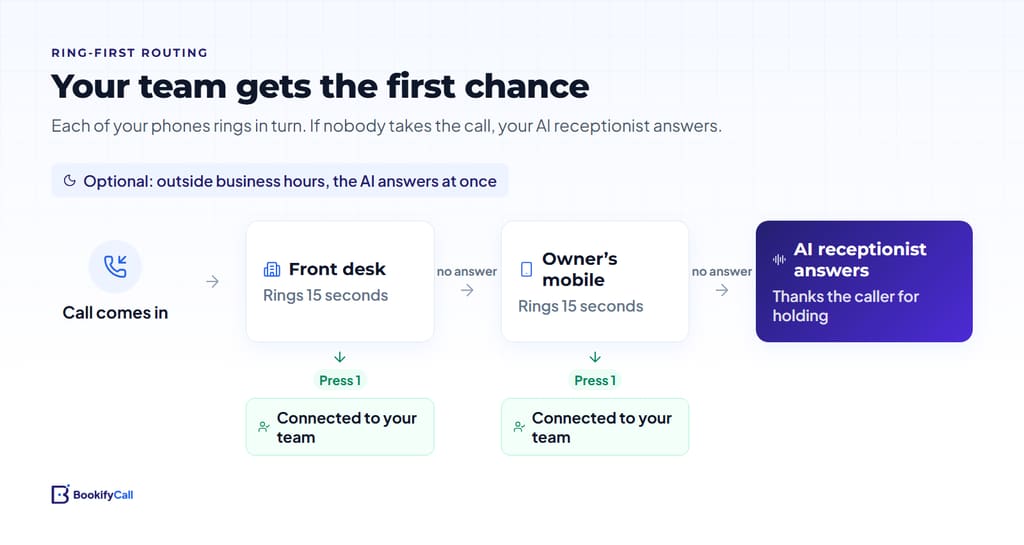
Here is what happens on a typical call, step by step:
- The call arrives at your BookifyCall number, or at your existing line if you forward it there.
- The first phone on your list rings for the time you chose, between 10 and 60 seconds (15 is the default). The caller hears normal ringing.
- With screening on (the default), whoever picks up hears a short prompt asking them to press 1 to take the call. Pressing 1 connects them to the caller.
- If that phone is busy, declines or goes unanswered, the next phone on the list rings.
- After the last phone, the AI answers. It knows the caller has been waiting, so it thanks them briefly for holding and then helps as normal: answering questions, booking an appointment, taking a message or transferring.
Two more controls shape the behaviour:
- Only during business hours. Outside the hours you set for the agent, the AI answers straight away. Nobody's phone rings at 11 pm.
- Order and timing. You choose which phones ring (up to five), who rings first and for how long. The settings show the total wait before the AI answers, so you can see the cost of each extra phone.
Calls your team answers are recorded like any other call, and your phones show the caller's number so you know who is on the line before you press 1.
Why the "press 1" step matters
Without a screening step, a ring chain has a quiet failure mode. If a teammate's mobile is off or ignored, their personal voicemail picks up. As far as the phone network is concerned, the call was answered. The caller is now leaving a message in a mailbox nobody checks, and the AI never gets a chance to help.
A screening prompt fixes that. A voicemail greeting cannot press 1, so the call moves on to the next phone, and eventually to the AI. This technique is often called call whisper or call screening, and Twilio's developer glossary has a clear explanation of how call whisper works. In BookifyCall it is on by default and marked as recommended. Leave it on unless you have a strong reason not to.
Warm transfer vs cold transfer
Ring-first is about who hears the call before the AI. Transfers are about what happens after the AI has answered and worked out that the caller needs a person. You might use both.
When the AI transfers, it rings the transfer contacts you have listed, in your chosen order. If the caller asks for a specific person or role, that contact is tried first. Each contact can be set up as a cold or a warm transfer.
| Cold transfer | Warm transfer | |
|---|---|---|
| What your teammate hears | An optional short message you write (a "whisper"), then a prompt to press 1 | The AI's one-line summary of who is calling and why, then press 1 to join or 2 to decline |
| What the caller hears | Ringing, then your teammate | Hold music, then your teammate |
| Speed | Fastest | A few seconds longer |
| Best for | Simple handoffs where the reason is obvious | Anything where context saves the caller repeating themselves |
If nobody accepts, the caller is not left hanging. The AI comes back on the line, explains that nobody is available right now, and offers to take a message or book a callback. You get the message with the call's summary and transcript afterwards.
The number of transfer contacts you can add depends on your plan. See current plan limits on the pricing page.
Ring-first or AI-first: how to choose
Ask yourself one honest question: when the phone rings during opening hours, how often does someone actually pick up within 15 seconds?
- Most of the time. Ring-first makes sense. Callers who prefer a person usually get one, and the AI covers lunch breaks, busy moments and sick days.
- Some of the time. Try ring-first with one phone and a short ring time, or AI-first with a warm transfer to whoever is free. Read your call summaries after a week and adjust.
- Rarely. Let the AI answer first. Making callers listen to 30 seconds of ringing before they reach help is worse than a quick, capable answer.
A few other factors tip the balance:
- Wait time adds up. Every phone you add makes the slowest path longer. Two phones at 15 seconds is a 30-second wait before the AI speaks.
- Bookings. If most calls are simple bookings, the AI can usually handle them fully, including checking your calendar. Our guide to how AI phone booking works with Google Calendar explains the details.
- After hours. Use the business-hours-only setting so evenings and weekends go straight to the AI.
- Urgent calls. For emergencies, AI-first with a warm transfer to an on-call person often reaches the right human faster than a ring chain, because the AI can recognize the calls you have described to it as urgent.
Three example set-ups
These are illustrative examples, not real customers. Adjust the names and timings to your business.
Example 1: the solo owner
A mobile dog groomer works alone and is usually mid-appointment with wet hands.
- Ring-first: off. The AI answers at once.
- Transfers: one contact, the owner's mobile, as a warm transfer, used only for urgent calls such as a client running late or a cancellation today.
- Why it works: the owner rarely has a free hand, so ringing their phone first would just add a wait. The AI books and answers, and the summary arrives by email.
Example 2: the two-person office
A small accounting practice has a front-desk manager and a partner who is often in client meetings.
- Ring-first: on, business hours only. Front desk rings for 20 seconds. Then the AI answers.
- Press 1: on.
- Transfers: front desk first (warm), partner second (warm), so the AI can still reach a person when a caller asks for one.
- Why it works: the front desk answers most calls in person. When they are on another line or away from the desk, callers reach the AI in about 20 seconds instead of voicemail.
Example 3: the busy shop
A three-bay auto repair shop has a service counter, a shop foreman and an owner. Phones ring constantly in the morning.
- Ring-first: on, business hours only. Service counter for 15 seconds, then the foreman's mobile for 10 seconds. Then the AI.
- Transfers: service counter (cold, with a whisper like "Customer asking about a repair status") and the owner (warm) for complaints or large quotes.
- Why it works: the counter takes calls when it can, the foreman catches some overflow, and the AI books inspections and answers hours and pricing questions during the rush. The longest wait is 25 seconds.
Running a trades business? Our page on the AI receptionist for plumbers, HVAC and electricians covers urgent call handling in more detail.
Common routing mistakes to avoid
- Too many phones in the chain. If the total wait is over about 30 seconds, ask whether each phone really earns its place.
- Turning off the press 1 step. This is the main way calls end up in personal voicemail boxes.
- Listing a line that forwards back to the AI. If one of your phones forwards its calls to your BookifyCall number, putting it in the ring chain can send the call in a circle. BookifyCall will not let you add its own number to the list, but it cannot see forwarding rules set at your carrier.
- Forgetting to brief the team. Tell everyone what the "press 1" prompt means, and that declining is fine because the AI will pick up.
- Vague transfer rules. The AI follows what you tell it. Spell out when to transfer and when to take a message. Our checklist of what to tell your AI receptionist includes transfer rules.
How to test your call routing
Set aside 15 minutes and make a few test calls from a phone that is not on your list.
- Call during business hours and let every phone ring out. Check that the AI answers and acknowledges the wait.
- Call again and answer on the first phone. Press 1 and check you are connected.
- Answer but do not press 1. The call should move on to the next phone.
- Call outside business hours (if you use that setting). The AI should answer at once.
- Ask the AI for a person. Check the transfer rings the right contact and, for warm transfers, that the summary makes sense.
- Read the call summaries and transcripts afterwards to confirm everything was logged.
The BookifyCall help center has more on settings and test calls, and our step-by-step guide to setting up an AI receptionist covers forwarding your existing number.
Frequently asked questions
How long should each phone ring before moving on?
Fifteen to twenty seconds is a sensible starting point. That is long enough for someone at a desk to answer and short enough that callers are not kept waiting. Keep the total across all phones under about 30 seconds where you can.
Will the caller know they were waiting?
They hear normal ringing while your phones ring. If the call reaches the AI, it thanks them briefly for holding before helping, so the wait is acknowledged rather than ignored.
What happens if nobody accepts a warm transfer?
The AI comes back on the line, tells the caller nobody is available right now, and offers to take a message or book a callback. You see the message and the call summary afterwards.
Can I ring my team only during business hours?
Yes. With the business-hours-only setting on, your phones ring only while the agent's hours say you are open. Outside those hours, the AI answers straight away.
Is a warm transfer slower than a cold one?
Slightly. The caller hears hold music for a few seconds while your teammate hears who is calling and why. In return, the caller does not have to explain everything again, which usually makes the call shorter overall.
Can I use my phone company's call forwarding instead?
Yes. Carrier no-answer forwarding sends unanswered calls on your existing line to your AI number. It is simple, but your carrier decides how many rings happen first, and you cannot set an order across several phones.
Good call routing is short and predictable. Pick the pattern that matches how often your team can really pick up, keep the wait short, leave screening on, and let the AI cover the gaps. Then read a week of call summaries and adjust. For the other half of the picture, calls you make rather than receive, see our guide to scheduling follow-up calls that connect.