
Scheduling follow-up calls: timing, time zones and retries
Aniket SinghCall handling9 min readUpdated

Scheduling follow-up calls that actually connect comes down to three things: calling when the person is likely to pick up, getting their time zone right, and spacing your retries sensibly. Most failed callbacks are not bad luck. They land at the wrong hour, try once and give up, or go to a number that was never going to work.
This guide covers how to pick a time, how to handle time zones and calling hours, how many retries to set and how far apart, and how to read the reasons a call did not connect. It uses BookifyCall's scheduled calls as the worked example, but the principles apply to any callback process, including one run by people.
Key takeaways
- Call when the person said they would be free. If they did not say, aim for their mid-morning or early evening, in their time zone.
- Enter the time in your own clock, then check what time it will be for them before you save.
- Keep calls between 8 am and 9 pm in the contact's local time. That is the federal calling window for US telemarketing, and a good courtesy rule for any call.
- Three tries is a sensible default. Space them by urgency: minutes apart for a hot lead, hours or a day apart for a routine follow-up.
- Read failure reasons by side: they didn't pick up, their number, your settings, or the network. Each one has a different fix.
Why follow-up calls fail to connect
When a callback does not connect, the cause usually falls into one of five buckets:
- Wrong time. The call lands during the school run, a work meeting, or before they are awake.
- Wrong time zone. A 9 am call from your office is a 6 am call for someone three hours behind.
- Too few tries. One missed call and the lead is marked dead, even though they would have answered an hour later.
- Bad number. A typo when the lead was captured, or a phone that is switched off.
- Something on your side. An agent that is paused, plan minutes that have run out, or calling to a country your phone account does not allow.
The first three are about scheduling. The last two are about data and set-up. A good callback process handles both, and tells you which one went wrong.
Scheduling follow-up calls: picking the right time
The best time to call is the time the person asked for. If a caller tells your AI receptionist "call me back after 4 tomorrow", that beats any general rule. Capture it and use it.
When you do not have a stated time, use common sense about the person's day:
| Who you are calling | Usually better | Usually worse |
|---|---|---|
| Homeowners and consumers | Mid-morning, early evening | Early morning, dinner time, late evening |
| Office workers | Late morning, mid-afternoon | Start of the workday, lunch |
| Trades and field workers | Early morning before jobs, end of day | Midday while on site |
| Other businesses | Within their opening hours | Their busiest hour (for a salon, Saturday morning) |
These are rules of thumb, not data. Your own call history is the better guide. After a few weeks, look at which callbacks connected and when, and shift your defaults.
How it looks in BookifyCall
To schedule a call, you pick a lead (or type any number), choose the agent that will make the call, and set the date and time. Quick picks such as "In 1 hour", "Tomorrow 9:00" and "Next business day 9:00" cover the common cases.
Add a reason, such as "Follow up on the quote", and the agent opens the call with it. That matters more than it sounds. A call that starts "Hi, it's Sam from Riverside Plumbing, calling back about the water heater quote you asked for" gets a very different reaction from a vague greeting. You can also add notes for background.
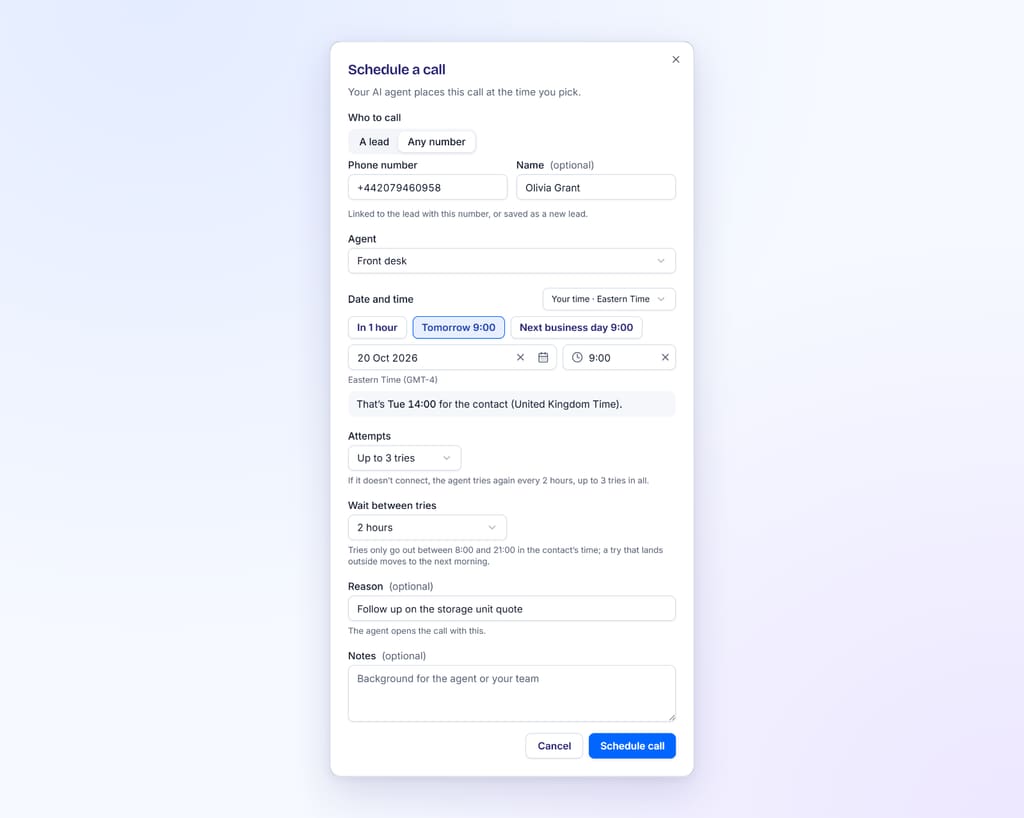
If you pick a time outside your agent's business hours, the dialog says so. The call can still go out, but people are less likely to pick up.
Time zones: enter your time, check theirs
Time zone mistakes are easy to make and awkward to explain. The safest habit is simple: type the time in your own clock, then check what it will be for them.
BookifyCall works this way. You enter times in your own time zone by default, and you can switch to your agent's business hours zone or the contact's time instead. When the contact's time zone is known and differs from the one you are typing in, the dialog shows a line such as "That's Tue 3:00 PM for the contact (London)."
One honest limitation: the app works out the contact's time zone from the country code of their number. For countries with one main time zone, that is reliable. For countries that span several zones, including the US and Canada, it cannot tell from the number alone, so it uses your agent's business time zone. If you are in New York calling a lead in Los Angeles, do the three-hour check yourself.
Calling hours: 8 am to 9 pm, their time
Scheduled calls only go out during calling hours, which are 8 am to 9 pm in the contact's local time by default (or your agent's time zone when the contact's zone is not known). If a try would land outside that window, it moves to the next morning. The dialog warns you when your chosen time falls outside it, and the call shows "Waiting for calling hours" until it can go.
The window is not arbitrary. In the US, the FCC's rules under the Telephone Consumer Protection Act bar telephone solicitations to residential subscribers before 8 a.m. or after 9 p.m., local time at the called party's location. The FTC's Telemarketing Sales Rule sets the same 8:00 a.m. to 9:00 p.m. window for telemarketing calls. A callback a customer asked for is not necessarily a solicitation, but the same window is a good rule for any business call.
Calling leads with an AI voice raises consent questions too. Our guide to AI phone calls, recording and consent covers the basics, including the FCC's 2024 ruling on AI-generated voices.
Retry spacing: how many tries, and how far apart
A single try is rarely enough. People miss calls for ordinary reasons: driving, a meeting, a phone in another room. A second or third try at a different moment often connects.
BookifyCall lets you set up to five tries per scheduled call, with three as the default. You choose how far apart they are:
| Option | Gaps between tries | Good for |
|---|---|---|
| Automatic | 5, then 10, then 20, then 40 minutes | Hot leads and same-day callbacks, where they may just be finishing something |
| Preset wait | 15 or 30 minutes, 1, 2 or 4 hours, or 1 day, every time | Routine follow-ups where you want a different part of the day |
| Custom wait | Anything from 5 minutes to 7 days | Specific patterns, such as "try again same time next week" |
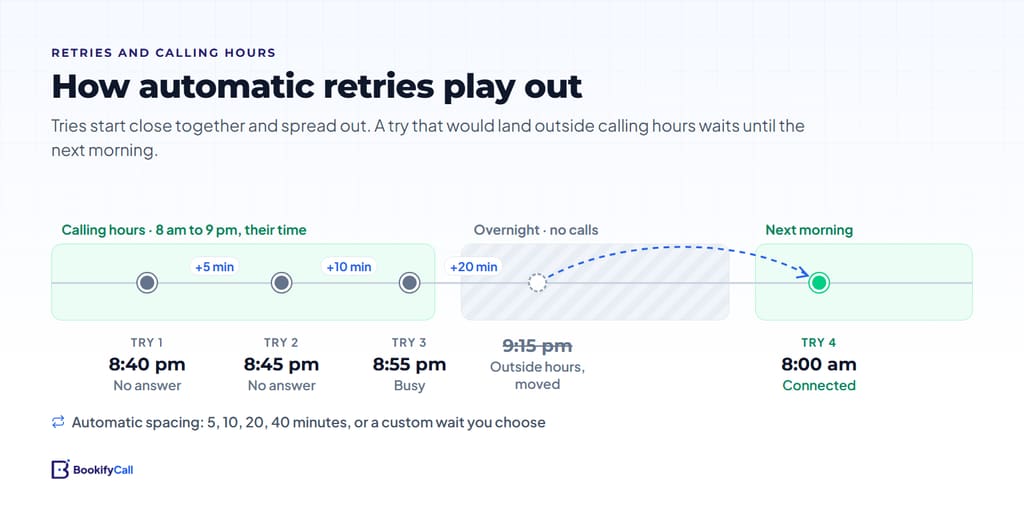
Matching retries to the situation
Here are three illustrative set-ups. They are examples, not benchmarks.
- A lead called while you were closed and asked for a callback first thing. Schedule for 9:00 their time, three tries, automatic spacing. If they are making coffee at 9:00, they may answer at 9:05 or 9:15.
- A quote follow-up two days after a site visit. Three tries, 4 hours apart. That covers a morning, an afternoon and the next day, so you are not ringing the same busy moment again.
- A "check in next month" customer. Two tries, 1 day apart, at the time of day they usually answered before.
More is not better. Five rapid tries can feel like pressure, especially from a number the person does not recognize. If three well-spaced tries do not connect, a different channel or a later date is usually kinder than a fourth call today.
Reading failure reasons
When a call does not connect, the reason tells you what to do next. BookifyCall shows it in plain words and groups it by whose side it is on:
| Side | Examples | What to do |
|---|---|---|
| They didn't pick up | No answer, declined, busy, reached voicemail | The call reached their phone. Try another time of day. |
| Contact's number | Number not valid, phone off or out of reach | Check the number with the contact. Look for typos in the lead. |
| Your settings | Calling this country is off, agent paused, plan minutes used up, trial ended | Something in your account stopped the call. Fix it, then call again. |
| Network or system | Couldn't connect, phone network error | Not caused by you or your contact. Retry, and contact support if it keeps happening. |
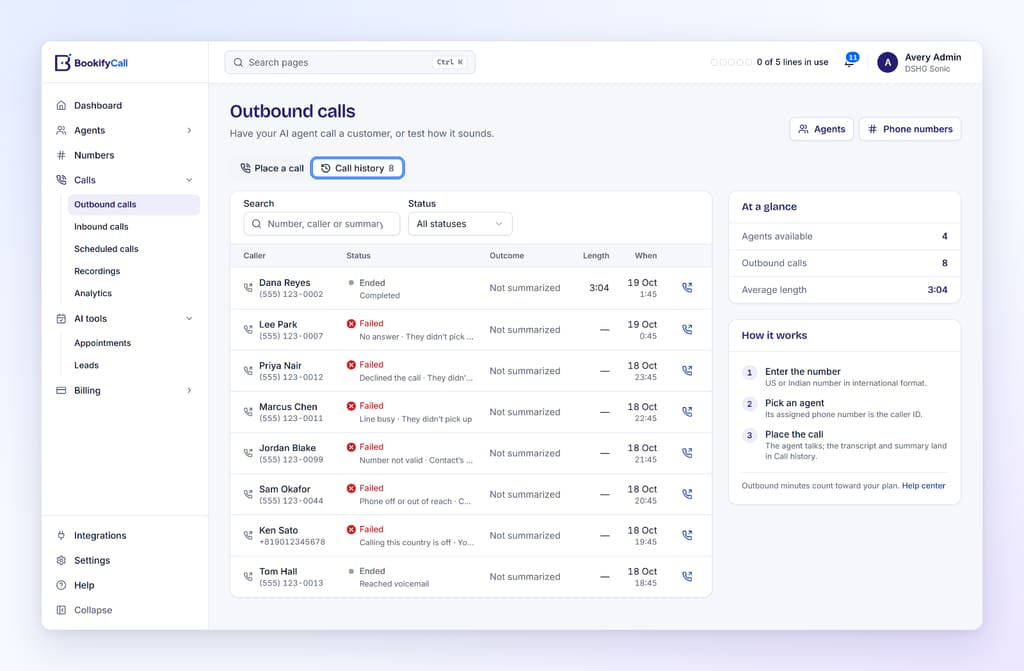
Some scheduled calls show a waiting state rather than a failure. "Waiting for a free line" means all your lines were busy; it retries every minute for up to two hours. "Waiting for calling hours" means the contact's local time is outside the window. "Waiting: agent paused" or "plan minutes used up" point to your settings. You can check plan minutes on the pricing page.
Practical ways to improve connect rates
- Capture the number carefully. Many "number not valid" results start at capture. If a human takes some of your leads, read numbers back.
- Ask when to call back. Tell your AI receptionist to ask callers for a good time when they request a callback. Our checklist of what to tell your AI receptionist includes this.
- Say who is calling, and why, straight away. Always add a reason. People hang up on calls that sound like cold sales.
- Tell people the number you will call from. If your website, quotes and emails show your BookifyCall number, a callback from it looks familiar.
- Use the right gap. Close together for urgent, spread across the day for routine.
- Fix "your settings" failures the same day. They will keep happening until you do.
- Review weekly. Read the reasons on calls that did not connect and look for patterns: a time of day, a lead source, a country.
Callbacks are especially useful for businesses that cannot always answer in the moment. Real estate agents, for example, often book showings from callbacks. See our guide for real estate agents catching buyer calls while showing homes.
Frequently asked questions
What is the best time to call customers back?
The time they asked for. Without that, mid-morning or early evening in their time zone tends to suit consumers, and late morning or mid-afternoon suits office workers. Check your own call history after a few weeks and adjust.
Why does my scheduled call say "Waiting for calling hours"?
The scheduled time falls outside 8 am to 9 pm in the contact's local time (or your agent's time zone, if the contact's zone is unknown). The call waits and goes out when the window opens, usually the next morning.
How many retries should I set?
Three is a good default. Use automatic spacing for urgent callbacks and a wait of a few hours or a day for routine follow-ups. More than three tries in a short time can feel like pressure.
Does the app know my contact's time zone?
For countries with one main time zone, yes: it reads the country code. For multi-zone countries such as the US and Canada, it uses your agent's business time zone, so check the contact's local time yourself when calling across zones.
What does a "Your settings" failure mean?
Something in your account stopped the call, such as calling to a country that is not enabled, a paused agent, or plan minutes that have run out. Fix the setting and schedule the call again. The help center has step-by-step fixes.
Good follow-up calls are mostly about respect for the other person's day: the right hour, their time zone, a clear reason and a sensible number of tries. Set those once, read the failure reasons weekly, and your callbacks will connect more often. If you are still deciding whether an AI receptionist fits your business at all, start with our plain-English guide to AI receptionists.