AI receptionist script: a checklist of what to tell your agent
Aniket SinghHow-to9 min readUpdated

A good AI receptionist script is not a word-for-word script. It is a short, accurate fact sheet the agent answers from: your hours and holiday closures, services with lengths and prices, location or service area, booking rules, who gets transferred calls, what it must never say, and the questions callers ask every week. Give it those, test it with a few calls, and refine from the call summaries.
This checklist walks through each section with examples you can copy and adapt. It is written for small, appointment-based businesses, and most of it applies to any AI phone agent. Where it helps, we show where each item goes in BookifyCall.
Key takeaways
- Modern AI receptionists compose their own replies, so you supply facts and rules rather than lines to read out.
- Eight sections cover most calls: hours, services, prices, location, booking rules, transfer rules, things to never say, and FAQs.
- Write in plain, specific sentences with real numbers. "From $65" beats "competitive pricing".
- If you do not want a price quoted on the phone, leave it out. The agent should not guess.
- Your first week of call summaries is the best editor you will get. Each unanswered question is a line to add.
Why an AI receptionist script is a fact sheet, not a word-for-word script
Older phone systems played recorded menus, and human answering services worked from scripts with fixed wording. An AI receptionist works differently. It listens to what the caller says and puts together a reply from the information you gave it, in the tone you picked.
That changes what you need to write. You do not need to predict every way a caller might ask "are you open Sunday?". You need to state your Sunday hours clearly once. The agent handles the phrasing. On BookifyCall you can even see a sample opening line in the greeting preview while you set up the agent. The real greeting is composed live on each call, so the wording varies a little.
The flip side matters just as much. An AI receptionist that answers honestly will only be as good as its facts. BookifyCall's agent does not make up answers it was not given. When something is missing, it takes a message or transfers the caller. So gaps in your fact sheet show up as "let me take a message", not as invented answers. If you are new to how this works, our guide to what an AI receptionist is covers the basics.
The checklist: what to tell your AI receptionist
Work through these eight sections in order. You will not need all of them on day one, but the first five cover most routine calls.
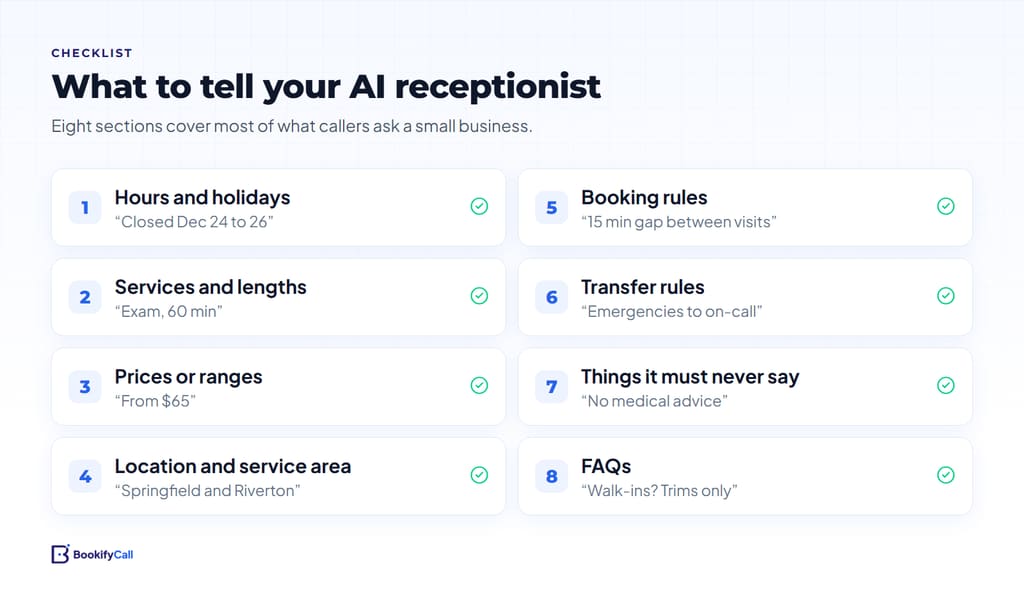
1. Hours, time zone and holiday closures
State your regular hours for each day and the time zone you work in. In BookifyCall these go in the Business hours step: pick the Time zone, switch each day on or off, and set opening and closing times.
Holidays are where most businesses slip. Add upcoming closures to your business description in plain words, for example "Closed December 24 to 26. Reopening December 27 at 9 am." Remove them once they pass. Do the same on your public listings so callers do not hear one thing from your agent and read another online. Google's help article on setting special hours on a Business Profile explains how to mark holiday hours there.
2. Services and how long they take
List the services callers actually ask about, not your full menu. For each one, say what it is, who it is for, and how long it takes.
In BookifyCall, open your agent, go to the Business details step and choose the Services tab. Each service has a Service name, an optional Category, an optional Price, and a box called What callers should know. You can add up to 25, and the app suggests starting with the ones callers ask about most.
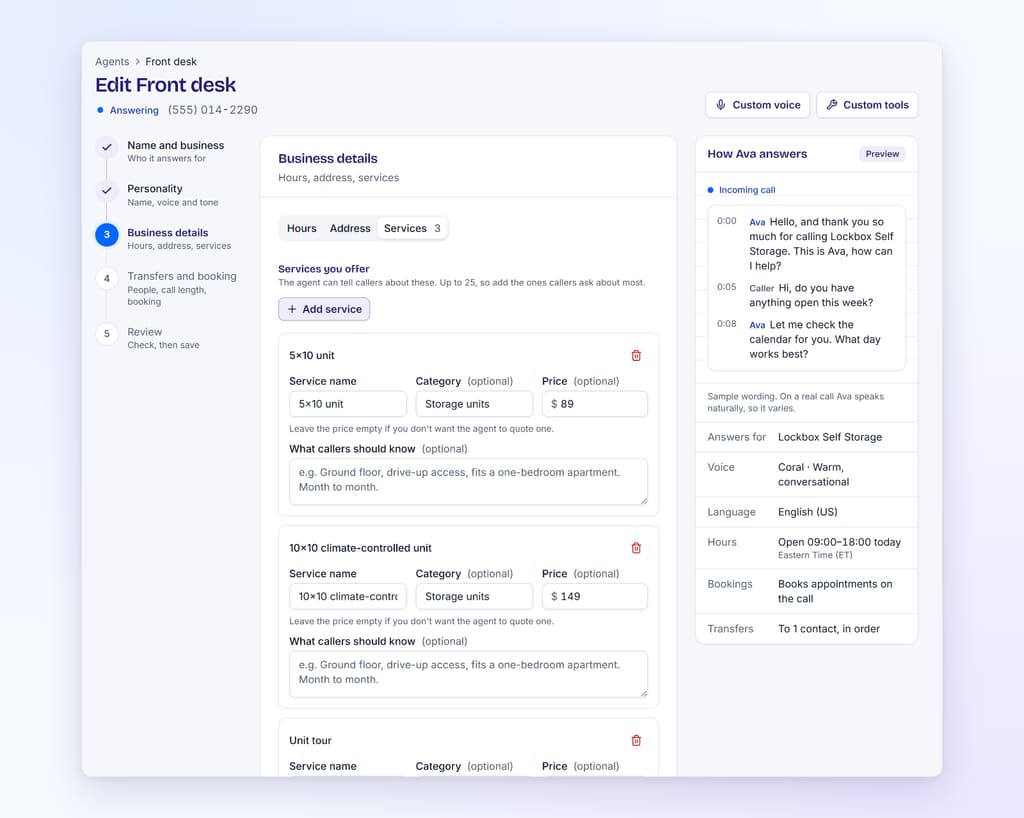
A hypothetical example for a dental office:
- Service name: New patient exam and cleaning
- Price: 180
- What callers should know: About 60 minutes. Includes X-rays. Please arrive 10 minutes early to fill in forms.
3. Prices or price ranges
Decide what you are comfortable quoting on the phone. Many businesses share a starting price or a range and explain what changes it. Others prefer to quote after a visit.
Either is fine, as long as the agent knows which. In BookifyCall, a service with no price set will not be quoted. The app says it plainly: "Leave the price empty if you don't want the agent to quote one." If you want a range, write it in the description: "Most repairs fall between $150 and $400 depending on parts. We give an exact quote on site." Google Business Profile has a similar services list with price and description fields, so it is worth keeping the two consistent.
4. Location, parking and service area
If customers come to you, give the address, the nearest landmark and how parking works. If you go to them, list the towns, ZIP codes or radius you cover, and what happens just outside it.
Example: "We serve Springfield, Riverton and Oak Hill. For addresses outside those towns, take their details and we will call back to confirm." For mobile trades this is one of the most common questions, which our AI receptionist for home services page covers in more depth.
5. Booking rules
Booking rules stop the agent from offering times that do not work for you. Write down:
- How long a standard appointment lasts.
- How much gap you need between bookings, for cleanup, notes or travel.
- The earliest and latest times you will take a booking.
- What the caller needs to provide (name, number, email for a video link, reason for the visit).
- Your cancellation or deposit policy, in one or two sentences.
In BookifyCall the first three are settings: Default length (minutes), Gap between bookings (minutes), and Book from and Book until. Policies go in your business description. Our guide to how AI phone booking works explains how these rules meet your calendar during a call.
6. Transfer rules
Decide which calls need a person, and which person. A simple rule set is enough for most small teams:
- Emergencies or urgent problems go to the on-call person.
- Billing disputes and complaints go to the owner or manager.
- Everything else, the agent handles or takes a message.
In BookifyCall, each transfer contact has a Role (owner, manager, support, sales or emergency), a Ring for time, and a Transfer type. Choose "Warm: they hear a summary first" if you want the AI to brief your teammate before connecting the caller. The optional Whisper field adds a short note your teammate hears, such as "Caller asking about a move-in this week". For routing ideas by team size, see ring your team first, then the AI.
7. Things it must never say or promise
This is the section owners most often skip, and it is short. Write it as plain rules. Typical examples:
- "Do not give medical, legal or financial advice. Offer to book a consultation instead."
- "Do not promise same-day service. Say we will confirm availability."
- "Do not discuss other clients or appointments."
- "Do not offer discounts."
Put these in your business description, then test them on purpose with a call. Rules are guidance for the AI, not a hard filter, so checking that it follows them is part of the job. Clinics in particular should keep personal health details out of the description entirely.
8. The questions callers ask every week
Finally, list your real FAQs with short answers. Look at your last few weeks of calls, emails and messages. The same handful usually come up: payment methods, what to bring, whether you take walk-ins, how long results take, whether you work weekends.
Write each as a question and a one or two sentence answer. "Do you take walk-ins? Nail trims only, Tuesday to Saturday. Everything else is by appointment." Paste them into the What your business does box, which holds up to 2,000 characters, and keep the longest details in your services notes.
How to write it so the agent uses it well
How you phrase the facts matters as much as which facts you include. A few habits make a big difference.
- Use numbers. "Appointments are 45 minutes" is clearer than "appointments do not take long".
- One fact per sentence. Short sentences are easier to quote back accurately.
- Say what to do, not just what is true. "If they ask about financing, take their details and the owner will call back."
- Avoid marketing language. "Award-winning, best-in-town service" gives a caller nothing. "Licensed and insured, 12 years in business" does, if it is true.
- Keep it current. Stale prices are worse than no prices.
Here is a short before and after, for a hypothetical bike repair shop:
Before: We offer great service and fair prices. Call us for details.
After: Basic tune-up $79, takes two working days. Flat repair $20 while you wait, about 20 minutes. We do not repair e-bike motors. Open Tuesday to Saturday, 10 am to 6 pm. Street parking out front.
The second version answers five questions before a caller asks them.
A phone answering script template for small businesses
If you want a starting point, fill in the blanks below and paste the result into your business description. Adjust the sections to fit your trade.
[Business name] is a [type of business] in [town]. We help [who] with [main services].
Hours: [days and times]. Closed [days]. Upcoming closures: [dates].
Location: [address]. Parking: [details]. We serve [towns or area] for visits.
Booking: appointments are usually [length]. New customers should [what to bring or know]. Cancellation policy: [one sentence].
Prices: [service] from [price]. We quote [other services] after [visit or call].
Transfers: put through [type of call] to [role]. For anything else, take a message with name, number and reason.
Never: [rules].
FAQs: [question and short answer, repeated].
For full setup steps around this, see how to set up an AI receptionist, step by step.
How to test and refine your AI receptionist with call summaries
Your fact sheet is a first draft until real callers use it. BookifyCall gives you a summary, full transcript, recording, captured lead and outcome for each call, and emails you when calls come in. Use them like this:
- Run five test calls before going live. Ask about hours, a price, a booking, something deliberately missing, and a rule from your "never" list.
- Read the transcripts, not just the summaries. Check the exact wording on prices and policies.
- Keep a "missing answers" list for the first week. Every "I can take a message for that" on a routine question is a line to add.
- Fix one section at a time. Update, save, and call again to confirm the change.
- Review monthly after that. Prices, staff and seasons change. A ten-minute check keeps the agent accurate.
The BookifyCall help center explains where each setting lives if you get stuck.
Frequently asked questions
Do I need to write an exact script for my AI receptionist?
No. An AI receptionist composes its replies from the facts and rules you give it. Focus on accurate hours, services, prices, booking rules and FAQs rather than exact wording.
How much information should I give it?
Enough to handle your routine calls well. Start with the questions you answer every week and your top services. Add more as call summaries show you what callers ask.
What if I do not want it to quote prices?
Leave prices out. In BookifyCall, a service with an empty price is not quoted. You can tell the agent to say quotes are given after a visit, and to take the caller's details.
What happens if a caller asks something I did not cover?
The agent does not invent an answer. It takes a message or transfers the call, and the question appears in the call summary so you can add it.
How do I handle holidays and one-off closures?
Add the dates to your business description in plain words, adjust your hours if needed, and remove the note once the dates pass. Update your public listings at the same time.
Should a clinic include patient details in the agent's information?
No. Keep the agent's information to general business facts like services, hours and policies. Our page on AI receptionists for salons and clinics covers clinic-specific setup.
The best AI receptionist script is the one your own front desk would recognize: your real hours, your real prices and the answers you give every day, written plainly. Start with the eight sections, test with a few calls, and let the summaries tell you what to add next. Compare plans when you are ready to try it with real callers.