
What is an AI receptionist? A plain-English guide
Aniket SinghGuides10 min readUpdated

What is an AI receptionist? It is software that answers your business phone, talks with callers in everyday language, answers their questions from information you give it, and books appointments straight into your calendar. When a call needs a person, it transfers the caller to you or a teammate. After the call, it sends you a summary so you know who called and what they wanted.
For a small business, that mostly means one thing: the phone gets answered when you can't get to it. You might be with a client, under a sink, showing a house or simply closed for the night. This guide explains how an AI receptionist works, what it can and can't do, who it suits, what it roughly costs and how to judge one before you sign up.
Key takeaways
- An AI receptionist answers calls, handles common questions, books appointments and hands off to a person when needed.
- It only knows what you tell it. Good ones take a message or transfer the call instead of guessing.
- It suits appointment-based businesses where calls come in while the owner or team is busy.
- Pricing is usually a monthly subscription, not an hourly wage, which changes the math for very small teams.
- Judge it with a real test call, not a demo video. Listen for accuracy, honesty about being an AI and clean handoffs.
What is an AI receptionist, in plain terms?
Think of the job a front-desk person does on the phone. According to the US Bureau of Labor Statistics, receptionists answer phones, greet visitors, schedule appointments and give general information about their organization. An AI receptionist takes on the phone part of that job: answering, informing, scheduling and routing.
It is different from the phone systems most people have met before. A phone tree makes callers press 1 or 2 and can't hold a conversation. Voicemail records a message and waits for you. An AI receptionist listens to what the caller says in their own words, replies out loud and can take action during the call, such as booking a slot.
| Option | What the caller experiences | What you get afterwards |
|---|---|---|
| Voicemail | A greeting and a beep | A recording, if they leave one |
| Phone tree (IVR) | Menus and keypad choices | The call routed to a line or mailbox |
| Live answering service | A human agent reading from your script | A message, sometimes a booking |
| AI receptionist | A spoken conversation, answers and booking | A summary, transcript, recording and the booked appointment |
If you are weighing those options against each other, our comparison of AI receptionists, answering services and voicemail goes deeper on cost and fit.
How does an AI receptionist work?
Most AI receptionists follow the same four-step flow on each call. The details vary by product, but the shape is consistent.
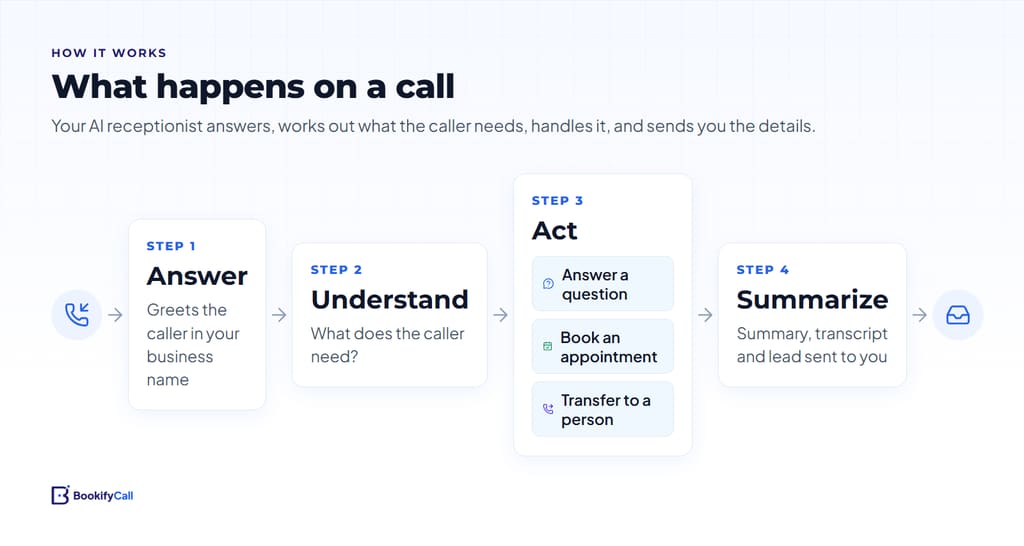
- Answer. The AI picks up in your business's name, in a voice you chose.
- Understand. It listens to what the caller wants. "Do you have anything Thursday afternoon?" and "I need to move my appointment" are different requests, and it treats them differently.
- Act. It answers the question from your business information, books an appointment, takes a message, or transfers the call to a person.
- Summarize. When the call ends, you get a written record: who called, their number, why they called and what happened.
Under the hood, three pieces work together. Speech recognition turns the caller's words into text. A language model works out what they mean and what to say next, guided by the instructions and facts you provided. A text-to-speech voice reads the reply back. Calendar and phone connections let it check availability, book slots and move calls.
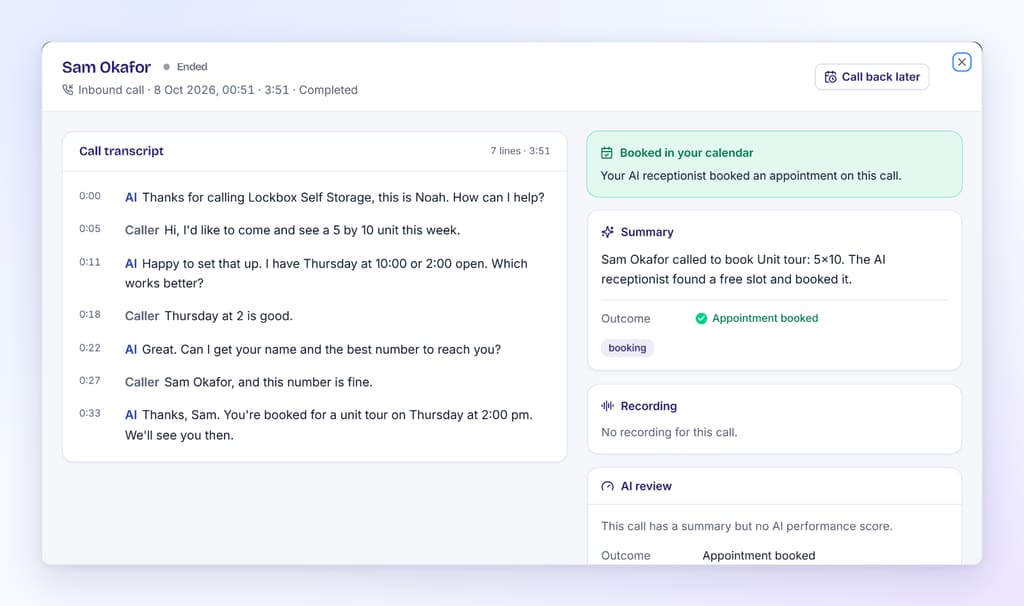
Here is a simple example. A caller asks a salon whether they can book a cut and color on Saturday. The AI checks the calendar, finds that 10:00 and 2:30 are open, offers both, books the one the caller picks and confirms the details. The owner sees the new booking and a two-line summary when they next look at their phone. Our guide to how AI phone booking works with Google Calendar and Calendly walks through that booking step in detail.
What an AI receptionist can and can't do
The honest answer is that an AI receptionist is very good at the repetitive middle of phone work and limited at the edges. It is worth knowing both before you rely on one.
| Usually handles well | Needs a person, or careful setup |
|---|---|
| Hours, location, parking and directions | Questions you never gave it an answer for |
| Services, rough prices and what's included | Firm quotes that depend on seeing the job |
| Booking new appointments and checking open times | Upset or emotional callers who want a human |
| Capturing name, number and reason for calling | Negotiations, complaints and judgment calls |
| Routing urgent calls to the right person | Anything requiring a license, such as medical or legal advice |
The most important limit is that it only knows what you tell it. A well-built AI receptionist should not invent a price or a policy it wasn't given. When it hits a gap, it should take a message or offer to transfer. That is why the setup step matters so much, and why we wrote a separate checklist on what to tell your AI receptionist about hours, services and FAQs.
The other thing to expect is a written trail. Most products give you a summary and transcript of each call, and many include a recording. That record is how you spot mistakes and fill gaps in its knowledge over time.
Who an AI receptionist suits, and who it doesn't
An AI receptionist for small business works best when calls are frequent, fairly predictable and often arrive while you are busy. Appointment-based businesses tend to fit that pattern.
Good fits
- Home services such as plumbers, HVAC and electricians, where the owner is on a job and after-hours calls matter. See how this works for home service businesses.
- Salons, clinics and dental offices, where staff are with clients and booking calls stack up. More on salons and clinics.
- Real estate agents, who take sign calls and showing requests while they are out. More on real estate.
- Self-storage, law firms and other offices that get the same handful of questions many times a day.
Weaker fits
- Businesses where most calls are complex consultations that need an expert from the first sentence.
- Very low call volumes, where voicemail and a quick callback already work fine.
- Teams whose callers strongly expect a human and would hang up on any automated voice. A hybrid setup, where your phones ring first and the AI picks up only if nobody answers, can help here. We cover that in ringing your team first, then the AI.
If you are not sure whether missed calls are actually costing you, it is worth running the numbers first. Our guide to what missed calls cost a small business has a simple formula you can fill in.
What does an AI receptionist cost?
Most AI receptionists are sold as a monthly subscription, often in tiers that differ by included minutes, number of phone lines or agents, and features such as extra languages or developer access. Some add usage charges beyond an allowance. Setup fees are less common than with traditional answering services, but check.
The useful comparison is against what you would otherwise pay to cover the phone. The BLS puts the median receptionist wage at $18.27 an hour (May 2025 data), before payroll taxes and benefits. A part-time hire also only covers the hours they work. A subscription that answers around the clock is a different kind of cost, and for a solo owner or a small team it is often a smaller one.
That doesn't make AI the right answer for everyone. A good receptionist does far more than answer the phone. But if the phone is the main gap, the comparison is worth doing honestly. You can see BookifyCall's current plans on the pricing page; it offers a 14-day free trial with no credit card required.
How to evaluate an AI receptionist before you commit
Demo videos are polished. Your callers won't be. The best way to judge an AI receptionist is to set it up with your real business details and call it yourself, several times, the way a customer would.
Questions to answer on your test calls
- Accuracy: Does it give your real hours, prices and policies? What does it do when you ask something it wasn't told?
- Booking: Does it check real availability, offer sensible times and put the appointment in your calendar correctly?
- Handoffs: Can it transfer an urgent call to the right person? Does it pass along why the caller is calling?
- Honesty: If you ask "Am I talking to a robot?", does it tell the truth?
- Records: Do you get a clear summary, transcript and recording afterwards, and are you notified quickly?
- Control: Can you change its knowledge, voice, hours and transfer rules yourself, without filing a ticket?
Be wary of big performance promises. The US Federal Trade Commission has made clear that AI marketing claims need evidence like any other claim. As FTC Chair Lina Khan put it when announcing a 2024 enforcement sweep, "there is no AI exemption from the laws on the books." If a vendor claims a specific result, ask how they measured it.
Why honesty about AI matters to your callers
Many people are uneasy about AI. In a 2023 Pew Research Center survey, 52% of US adults said they felt more concerned than excited about the growing use of AI in daily life. An AI receptionist that pretends to be human risks losing trust the moment a caller figures it out.
The better approach is simple: answer helpfully, admit to being an AI when asked and offer a person when the caller needs one. BookifyCall works this way; if a caller asks whether it's an AI, it tells the truth. For the rules around disclosure and call recording, see our overview of recording, disclosure and consent on AI phone calls.
What setting one up looks like
Most of the setup work is gathering your business information. The technical steps are short and look similar across products:
- Get a phone number from the provider, or plan to forward your existing line to it.
- Enter your business details: hours, services, prices or ranges, location and policies.
- Name the agent and pick a voice and personality.
- Connect your calendar so it can book.
- Add the people it can transfer calls to, and when.
- Make test calls, read the summaries and fix any gaps.
- Publish the number or turn on forwarding from your business line.
With BookifyCall, you get a dedicated number that you can publish or forward your current line to, and you can connect Google Calendar or Calendly for booking. Our step-by-step guide to setting up an AI receptionist covers each step with screenshots, and the how it works page gives the short version.
Frequently asked questions
Will callers know they are talking to an AI?
Some will notice and some won't. Modern AI voices sound natural, but they are not perfect. A trustworthy AI receptionist tells the truth when a caller asks. Many products also let it introduce itself as a virtual assistant from the start, if you prefer that.
Can an AI receptionist book appointments?
Yes, if it is connected to your calendar. It checks which times are free, offers open slots, books the one the caller chooses and confirms the details. BookifyCall books into Google Calendar during the call and also supports Calendly.
What happens if a caller asks something the AI doesn't know?
A well-designed AI receptionist should not guess. It takes a message with the caller's details or transfers the call to a person. You then add the missing answer to its knowledge so it can handle that question next time.
Do I need a new phone number?
Not necessarily. Most providers give you a number, and you can either publish it or forward your existing business line to it. Forwarding lets you keep the number customers already know.
Can it handle urgent or emergency calls?
It can recognize calls you describe as urgent and transfer them to the person you choose, such as an on-call technician. It should not be your only route for true emergencies, and you should test the transfer before relying on it.
Is an AI receptionist the same as a chatbot?
They use similar technology, but an AI receptionist works over the phone with speech rather than text, and it is connected to your phone line and calendar so it can transfer calls and book appointments.
An AI receptionist won't replace the judgment of a good front-desk person, and it shouldn't pretend to. What it can do is pick up the calls you can't, answer the simple questions well, book the appointment and tell you what happened. If that is the gap in your business, a short trial with real test calls will show you quickly whether it fits. You can read more about the product side on our AI receptionist overview.