
IVR vs AI receptionist: what changes for your callers
Aniket SinghCall handling7 min readUpdated

IVR vs AI receptionist comes down to one difference: an IVR asks callers to sort themselves through a menu of keypresses or short spoken commands, while an AI receptionist asks what they need in their own words and then answers, books or transfers. An IVR is predictable and strong at routing large volumes to fixed destinations. An AI receptionist suits small businesses whose callers mostly want answers and appointments, often while nobody is free to pick up.
This guide compares the two side by side, says plainly where an IVR is still the better choice, explains where conversational IVR fits, and shows how businesses use both.
Key takeaways
- An IVR or auto attendant routes the call. An AI receptionist tries to finish it: answer the question, book the slot, or hand off with context.
- IVRs win on high volume, strict routing, keypad entry and word-for-word compliance.
- AI receptionists win on open-ended questions, booking during the call and after-hours coverage for small teams.
- Conversational IVR adds speech to an IVR. It's mostly a contact-center tool.
- You don't have to pick one. A menu can hand one option to an AI, or an AI can transfer to your team.
The terms, briefly
An IVR (interactive voice response) is an automated phone system that plays prompts and acts on what the caller presses or says. An auto attendant is the simplest kind: a menu that sends callers to a person or department. Nextiva puts the difference to an AI receptionist neatly: "an auto attendant routes while an AI receptionist resolves". An AI receptionist holds a spoken conversation, answers from information you give it, books appointments and transfers calls when a person is needed. For the full definitions and how menus work under the hood, see what is IVR and what is an AI receptionist.
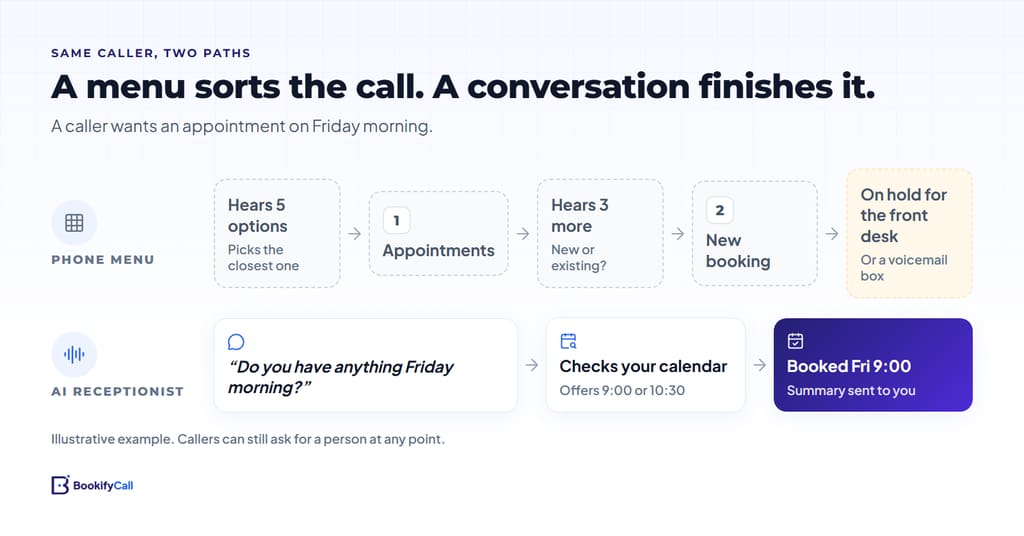
IVR vs AI receptionist, side by side
"Varies" means it depends on the product and how it's set up, so ask before you buy.
| IVR or auto attendant | AI receptionist | |
|---|---|---|
| How callers reach the right answer | Listen to options, then press a key or say a set phrase | Say what they need in their own words |
| What the caller needs to know | Which of your categories their question belongs to | Nothing in advance |
| Answering questions | Recorded messages; advanced IVRs can read data from connected systems | Answers from the business information you provide; takes a message or transfers when it doesn't know |
| Booking | Usually routes to a person; custom IVRs can book if built to | Can book into a connected calendar during the call |
| After hours | Plays a closed message, takes voicemail or routes to on-call | Answers, books and takes details at any hour |
| Reaching a person | A menu option, often "press 0" | Transfer on request or by your rules; some products ring your team first |
| Strict routing and compliance | Strong: the same path and the same words every time | Follows your rules, but a conversation is less fixed than a menu |
| Keypad entry (PINs, account numbers) | Built for it | Not its strength |
| Setup | Record prompts, design the tree, set destinations | Describe your business, services, hours and transfer contacts; connect a calendar |
| Upkeep | Re-record and re-route when anything changes | Update the information in plain text |
| Cost model | Often part of a business phone plan; custom IVRs add design work and usage costs | Usually a monthly subscription with usage limits |
| What you get afterwards | Call logs, and voicemails if left | Varies; BookifyCall sends a summary, transcript, recording and the caller's details |
Where an IVR is still the better choice
An IVR is a mature, dependable tool, and for some businesses it's the right one. Nextiva's own comparison says an auto attendant suits low or predictable call volume, simple routing and callers who already know the menu. Add these cases:
- High volume with fixed destinations. A large organization with many departments moves large call volumes to the right queue with a short menu. Regular callers learn the shortcut and get through fast.
- Strict or regulated routing. When certain calls must reach a specific team, or a disclosure must play in exact words before anything else, a menu does that the same way every time.
- Keypad entry. Account numbers, PINs and card payments are often better taken by keypad on a system built and certified for them.
- Self-service on connected systems. Enterprise IVRs can check a balance or an order status from a database without a person. That needs integration work, but it scales.
- Language selection at the door. "Press 2 for Spanish" is simple and clear. AI receptionists can speak several languages too (on BookifyCall that's the Pro and Enterprise plans), but a menu is a fine choice if you route by language to different teams.
Where an AI receptionist wins
- Calls that don't fit a category. "Is there parking, and can you fit me in Friday morning?" is two questions and no single menu option. A conversation handles both.
- Booking during the call. Connected to Google Calendar or Calendly, BookifyCall checks real availability, offers open slots and books the one the caller picks.
- Small teams without departments. A menu that sends four options to the same two people adds steps without adding answers.
- After hours. Instead of "we're closed, leave a message", callers get answers and a booked slot.
- A written record of the calls it handles. You see why people called and what happened, which a menu log can't tell you.
Callers' patience with menus is thin. In an October 2026 Parloa survey of US and European consumers, only about 7% said automated phone menus consistently resolve their concerns. That's a vendor survey of consumers in general, not of your callers. An AI receptionist only does better if it's set up well and honest about being an AI. BookifyCall tells callers the truth when they ask.
Conversational IVR: the middle ground
Conversational IVR, sometimes called AI IVR, replaces keypresses with speech. Callers say what they want and the system uses speech recognition to pick a route or a self-service task, which IBM describes as IVR that lets callers verbalize their needs. It's usually built on a contact-center platform and its job is still mostly routing to queues. For large teams that's a real improvement over a long menu. For a small business, it's often more system than the calls need. An AI receptionist is built for the other end: few people, many appointment and information calls.
Using both: hybrid setups
| Setup | How it works | Good for |
|---|---|---|
| Menu in front, AI for booking | Keep your IVR; send "press 1 to book or ask a question" to the AI receptionist's number | Businesses that must keep some regulated routing |
| AI in front, transfers behind | The AI answers and transfers to the right person by your rules, with a briefing first | Small offices with two or three people who take calls |
| Your team first, AI as backup | Your phones ring in order; the AI answers if nobody picks up | Teams who want to answer when they can |
| Menu by day, AI after hours | Your phone system's schedule sends after-hours calls to the AI | Offices with a front desk in working hours |
BookifyCall doesn't build caller menus. It handles the last three directly: transfers to your contacts (warm or cold), and ring-first, which rings up to five of your own phones before the AI picks up. Our guide to ringing your team first has examples. If you've decided to retire the menu, how to replace your phone tree gives you a mapping template.
How to decide: five questions
- Why do people call? Listen to a week of calls. If most want hours, prices or an appointment, an AI receptionist fits. If most need a specific department, a menu still works.
- Do any calls have rules you can't bend? Keep a menu or a separate number for those.
- How many people actually answer? If it's two or three, a menu mostly adds steps.
- What happens after hours today? If the answer is voicemail, count what that costs you in bookings.
- What would each cost at your real volume? Compare your phone plan's IVR against a subscription at your call volume. BookifyCall's plans are on the pricing page, with a 14-day trial and no credit card.
If you're also weighing a human service, see AI receptionist vs answering service.
Frequently asked questions
Is an AI receptionist a type of IVR?
Both answer calls automatically, but they work differently. An IVR is built around a menu and routing. An AI receptionist is built around a conversation: it answers questions, books appointments and transfers when needed. Some vendors call speech-enabled systems "AI IVR", which blurs the line.
What is the difference between an auto attendant and an AI receptionist?
An auto attendant plays a menu and sends callers to an extension or department. An AI receptionist talks with the caller and tries to finish the call itself, by answering, booking or handing off with context.
Can an AI receptionist route calls like an IVR?
It can transfer callers to the right person based on what they say and the rules you set, such as "billing questions go to the office manager". It doesn't play a keypad menu. For strict, fixed routing, a menu is still the more predictable tool.
Is conversational IVR the same as an AI receptionist?
Not quite. Conversational IVR adds speech recognition to an IVR, mainly to route calls in contact centers. An AI receptionist is aimed at small businesses and focuses on answering, booking and transferring.
Can I keep my IVR and add an AI receptionist?
Yes. If your phone system can send a menu option or after-hours calls to an outside number, point it at the AI receptionist's number. Callers who need the AI reach it, and your other routing stays as it is.