
HVAC answering service: no-heat triage, gas safety and surge days
Aniket SinghIndustries9 min read

An HVAC answering service picks up when your techs are in attics and crawl spaces and your office is closed. The useful ones don't just take a message. They ask your no-heat and no-cool questions, give a gas-smell caller your safety script before anything else, put true emergencies through to the on-call tech, and book tune-ups and estimates into your calendar. An AI receptionist can do this from the rules you write; a human service does it with a person on the line.
Our playbook for plumbers, HVAC and electricians covers trade calls in general. This post goes deeper on heating and cooling: the triage questions, the safety script, and how to handle the first cold snap of the year.
Key takeaways
- Write the four or five questions your dispatcher asks on a no-heat call. The AI asks them on each call.
- A gas smell or a carbon monoxide alarm gets a safety script first: leave, call the utility or 911 from outside. The transfer to on-call comes after.
- Decide in advance what happens when all your lines are busy: a message, a forward or hold.
- Book tune-ups in spring and fall slots and new-system estimates as visits. Never let the AI guess a repair price.
- It books into Google Calendar or Calendly, not your field service software, and it doesn't take payments.
What an HVAC answering service has to handle
HVAC calls follow the weather. Most weeks bring tune-ups, estimates and the odd thermostat question; a hard freeze or a heat wave brings people with no heat or no cooling. ENERGY STAR advises homeowners to check the cooling system in the spring and the heating system in the fall, and to book ahead of the busy seasons, so your quiet months can be booking months.
| Call | What the AI does | When a person takes over |
|---|---|---|
| Gas smell near the furnace or water heater | Reads your safety script first: leave now, call the gas utility or 911 from outside | After the safety message, to on-call if you choose |
| Carbon monoxide alarm going off | Tells the caller to get everyone outside and call 911 | After the safety message, to on-call |
| No heat in freezing weather | Asks your triage questions, takes the address | Right away, when it meets your urgent rules |
| No cooling in a heat wave | Asks who's in the home if you've told it to | Right away, when it meets your urgent rules |
| Water dripping from the indoor unit, odd noises, short cycling | Takes the details, quotes your diagnostic fee, books a visit | No, unless the caller asks for a person |
| Spring or fall tune-up | Quotes your listed price, books a maintenance slot | No |
| New system or replacement estimate | Takes the age of the system and the home basics, books an estimate visit | No |
| Outside your service area | Says so early, politely | No |
| Billing, warranty, a job that went wrong | Takes the details and the job address | The office, in business hours |
No-heat triage: the questions to write down
On no-heat calls, a good dispatcher asks a few quick questions before waking a tech at 1 am. Write yours down in plain words and the AI asks them in order. A starting set:
- Any gas smell, or is a carbon monoxide alarm sounding? If yes, stop and read the safety script.
- What is the system doing? Completely off, running but blowing cold air, or turning on and off.
- Who is in the home? Infants, older adults or anyone with a medical condition, if your rules treat that as urgent.
- How cold is it inside? Callers often know the thermostat reading.
- The checks you approve. Is the thermostat set to heat? Is it showing a display? Keep this to what you're comfortable having a homeowner check. The AI shouldn't troubleshoot beyond your script.
Then the rule: which answers make it urgent tonight, and which become the first window tomorrow. For example: "No heat and below 40°F outside, or anyone vulnerable in the home: transfer to on-call. Otherwise book the first open morning window and tell them the after-hours rate if they still want someone tonight." Your numbers will differ; the point is to write them.
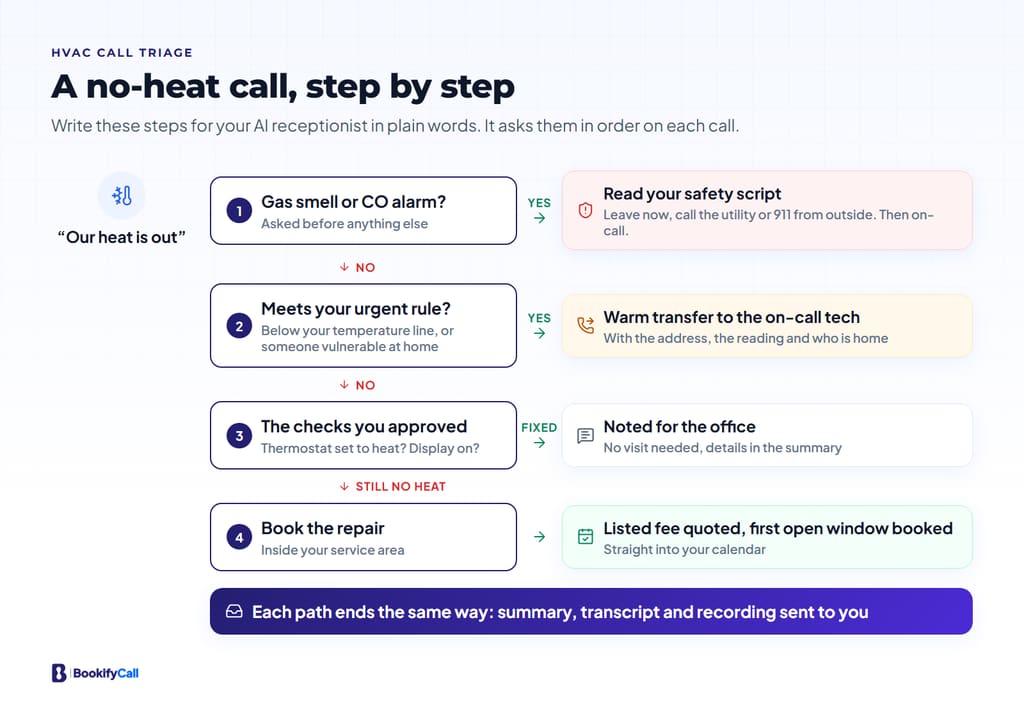
No-cool calls in a heat wave
No cooling on a mild day is a booking. No cooling in a heat wave, with an older parent in the house, may not be. The CDC notes that people aged 65 or older are more prone to heat-related health problems, and that infants and people with chronic conditions face extra risk too. If your shop prioritizes those households, tell the AI to ask, and to transfer when the answer matches your rule. If anyone is showing signs of heat illness, the caller should call 911 first.
The gas-smell safety script comes first
When a caller smells gas, your job isn't to send a tech. It's to get people out of the house. The American Gas Association's advice is to leave the building immediately and take others with you, avoid anything that could make a spark (switches, matches, starting a car, using a phone near the leak), and call 911 or the gas utility from a phone away from the area.
For carbon monoxide, the US Consumer Product Safety Commission says: "If you suspect CO poisoning, get outside to fresh air immediately, and then call 911."
Turn that into a short script for the AI to say before it asks a single triage question:
"Please leave the house now and take everyone with you. Don't touch light switches or start a car. Once you're outside and away from the house, call 911 or your gas company. When you're safe, call us back and we'll get our on-call technician to you."
Some shops prefer the AI to stay on the line and transfer to on-call after the script, so the tech can coordinate with the utility. Either works; pick one and write it down. An AI receptionist answers your business line. It isn't an emergency service, and your instructions should say so.
Cold snaps and heat waves: when the phone won't stop
Surge days are when an answering service earns its keep, and when a bad setup shows. Three settings matter.
- Busy lines. When all your lines are in use, BookifyCall lets you choose whether callers leave a message, get forwarded or hold. On a freeze night, taking a message and calling back is usually kinder than a long hold.
- On-call depth. One on-call tech can't take ten transfers an hour. Add a second transfer contact for surge nights (the number of contacts depends on your plan), and tighten your urgent rule so only true emergencies go through.
- Answer when you can. BookifyCall can ring up to five of your own phones in order, for 10 to 60 seconds each, before the AI picks up. During the day that keeps your dispatcher first; the AI catches what they can't.
After the surge, use scheduled callbacks: the AI calls a homeowner back at a set time with a reason, such as "checking your furnace is still running after last night's repair," and retries if nobody answers, only during calling hours in the contact's local time. Our post on follow-up calls, time zones and retries covers timing.
Booking tune-ups and estimates
BookifyCall checks your Google Calendar's real free and busy times during the call, offers open slots and books one. Calendly works too. A few HVAC habits help:
- Maintenance slots. Give tune-ups their own length. If you only run maintenance routes on some days, check the AI's first tune-up bookings, since it offers any open time in your calendar.
- Arrival windows. Name them as windows ("between 8 and 10") so callers don't expect 8:00 sharp.
- Estimates for new systems. Tell the AI what to collect: the age and type of the current system, which rooms are uncomfortable, and who needs to be home. Book a visit; don't quote a replacement by phone.
- Memberships. If you sell a maintenance plan, give the AI your exact wording, price and what it includes.
Prices follow one rule: the AI quotes only what you list (diagnostic fee, tune-up price, after-hours rate). Anything that depends on what the tech finds becomes a visit. Booking mechanics are in how AI phone booking works with Google Calendar and Calendly.
What to tell an AI receptionist for HVAC
- Service area by town or ZIP code, and any areas you only cover for installs
- Brands and system types you service (furnaces, boilers, heat pumps, mini-splits) and the ones you don't
- Diagnostic fee, after-hours rate, tune-up price, and whether fees count toward the repair
- Your no-heat and no-cool questions, and the rule that makes a call urgent
- The gas and carbon monoxide safety script, word for word
- On-call and backup transfer contacts, kept current with the rotation
- Licensing and insurance in one sentence the AI can repeat
If you also manage rentals, or your techs get calls from property managers, our guide to an AI receptionist for property management shows the same triage from the landlord's side.
AI or human HVAC answering service?
A live answering service gives callers a person, and good ones handle panicked homeowners well. They usually charge by the minute or call, so a heat wave means a bigger bill, and many take messages rather than booking. An AI receptionist charges a subscription, follows your script and books into your calendar during the call, but it only knows what you tell it. Some shops use both: AI for booking and overflow, a person for emergencies. Our AI receptionist vs answering service comparison goes through the trade-offs.
Where an AI receptionist falls short for HVAC
- It can't diagnose. It asks your questions and stops there. No refrigerant advice, no reset instructions you haven't approved.
- It books into your calendar, not your dispatch board. If you run jobs from field service software, someone moves bookings over.
- It doesn't take payments. Deposits and card details stay with your office.
- It isn't an emergency service. Gas, carbon monoxide and fire calls get your safety script and a transfer.
Example call walkthrough
This is a made-up call to a fictional company during a heat wave.
AI: Thanks for calling Northfield Heating and Cooling, this is Sam. How can I help?
Caller: Our AC stopped blowing cold this afternoon. It's 88 in the house.
AI: I'm sorry, that's hot. Is anyone in the home over 65, a baby, or someone with a medical condition?
Caller: My dad's 79 and he lives with us.
AI: Thanks. I'll treat this as urgent. What's the address?
Caller: 31 Birch Lane.
AI: After-hours visits have a $140 call-out fee. I'm connecting you to our on-call technician now and letting her know what's happening.
(The AI briefs the tech: no cooling, 88°F inside, 79-year-old in the home, 31 Birch Lane. Then it connects the caller.)
The fee and the details are examples. Use your own.
Frequently asked questions
What is an HVAC after-hours answering service?
A service that answers your line when the office is closed, sorts urgent heating and cooling calls from routine ones, and either takes a message, transfers to your on-call tech or books a visit. It can be a human call center or an AI receptionist.
How does an AI receptionist for HVAC decide a no-heat call is urgent?
From the rule you write, such as the outdoor temperature, how cold it is inside, or whether someone vulnerable lives in the home. Calls that match are warm-transferred to on-call with the reason; the rest are booked.
What should it say when a caller smells gas?
Your safety script, before anything else: leave the house, don't touch switches, and call 911 or the gas utility from outside. Then it can take the address and transfer to your on-call tech.
Can it quote repair prices?
Only the prices you list, such as the diagnostic fee, tune-up price or after-hours rate. For repairs and replacements it books a visit instead of guessing.
Can I keep my existing business number?
Yes. You get a dedicated BookifyCall number and can forward your existing line to it, so the number on your vans stays the same. The details for trades are on our AI receptionist for home services page.
Start with your no-heat questions, your safety script and one current on-call contact, then read the summaries from the first cold night. BookifyCall has a 14-day free trial with no credit card required; plans are on the pricing page. You can also hear an AI receptionist on our demo line, (860) 955-9240.