
AI receptionist for self storage: unit questions, gate issues and move-in bookings
Aniket SinghIndustries8 min readUpdated

An AI receptionist for self storage answers your facility's phone when the office is empty, when you're out on the lot with a move-in, and long after the gate has closed for the night. It answers questions about unit sizes, prices and hours from the details you give it, and books tours and move-ins into your calendar during the call. Gate problems and anything urgent go to a person you choose.
Storage calls are short and predictable. The work is in the setup: what to tell the AI about your units, where it should stop, and who it hands off to.
Key takeaways
- Most storage calls are a size, a price, an hours question or a tour request. Write those answers down once.
- Give office hours and gate access hours separately. Callers mean different things by "open."
- Keep gate codes out of the AI's instructions. Send lockouts and access problems to an on-call person instead.
- It books tours and move-ins into Google Calendar or Calendly. You confirm the exact unit.
- It can't take payments. Rent, late fee and lien questions go to a person.
The calls a self storage facility gets
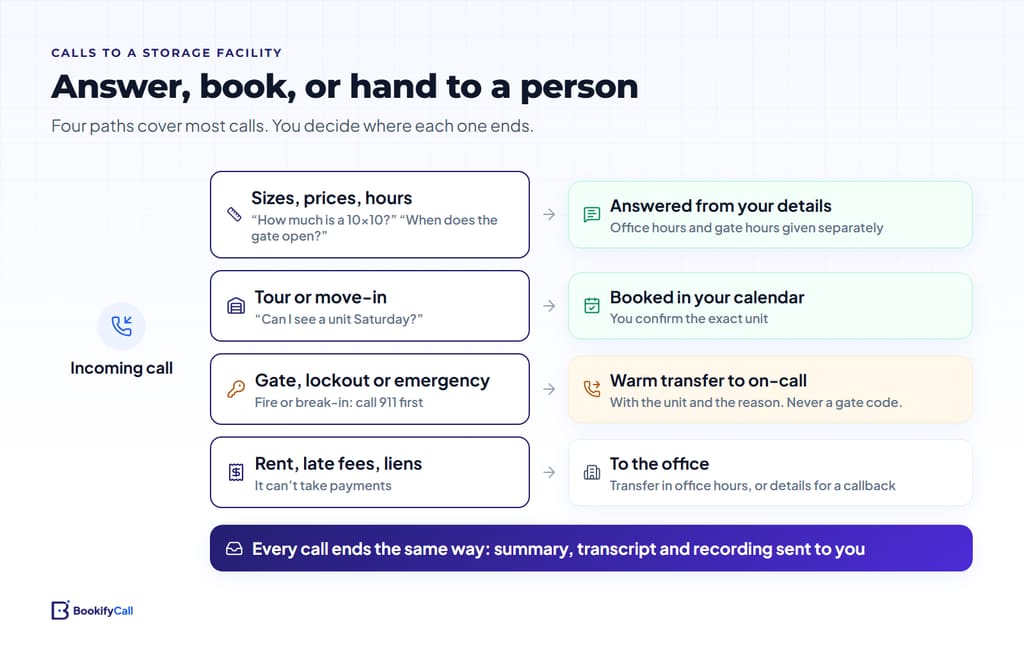
Many facilities run with one manager covering the office, the lot and the paperwork, and nobody on site after hours. Renters often plan a move in the evening or at the weekend, so they call when nobody can pick up. Here is how the usual calls split between the AI and a person.
| Call | What the AI does | When a person takes over |
|---|---|---|
| "What sizes do you have?" "Will my two-bedroom fit in a 10×15?" | Explains your sizes and what typically fits, from the guide you wrote | No |
| "How much is a 10×10?" | Quotes your listed rates and any current move-in special | No |
| "Are you open now?" "When can I get in?" | Gives office hours and gate hours separately | No |
| "Can I see a unit first?" "I'm moving Saturday." | Books a tour or move-in appointment in your calendar | No |
| "My code isn't working." "The gate won't open." | Takes the name, unit and location at the gate | Right away, to your on-call contact |
| Break-in, fire, someone hurt on site | Tells the caller to call 911 first, then takes details | Right away, to your on-call contact |
| Rent, late fees, auction or lien notices | Says it can't take payments, takes the details | During office hours, or a callback |
Unit sizes and prices: what to tell the agent
Callers rarely know what size they need. They know what they're storing. A short size guide in the AI's business details turns "I have a one-bedroom apartment" into a real answer. For each size, write:
- The size and type. 5×5 locker, 10×10 indoor, 10×20 drive-up, and so on.
- What usually fits. "A 10×10 usually holds the contents of a one-bedroom apartment." Use your own rules of thumb.
- Climate control. Which units have it, and the price difference.
- The monthly rate. Exactly as you'd quote it, plus any admin fee, deposit or insurance requirement.
- Current specials. With an end date. Update or delete them when they change, because the AI repeats what you wrote.
- What can't be stored. Your rental agreement's list of banned items (fuel, chemicals, perishable food, and so on), in plain words.
BookifyCall answers from what you give it and doesn't make up answers it wasn't given. If a caller asks something you haven't covered, it can take a message or transfer the call. For a general structure, see what to tell your AI receptionist.
Office hours and gate hours are different answers
"Are you open?" means one thing to a renter who wants to sign a lease and another to a tenant who wants to drop off boxes at 9 pm. Set your office hours in the agent's business hours. Describe gate access hours, and any 24-hour access for certain units, in its business details. Then the AI can say "The office opens at 9, and the gate is open from 6 am" without anyone turning up to a locked gate.
The agent answers at any hour either way. Business hours decide what it says about opening times and which tour slots it offers.
Booking tours and move-ins into your calendar
BookifyCall checks your Google Calendar's real free and busy times during the call, offers open slots and books one. Calendly works too. The caller's details and the size they want come through in the call summary. The mechanics are in how AI phone booking works with Google Calendar and Calendly.
One limit to plan around: BookifyCall doesn't connect to storage management software, so it can't see which units are vacant right now. Set it up to match:
- Book a tour or a move-in appointment, not a specific unit. You confirm the exact unit when the renter arrives, or call ahead if their size is gone.
- Say so on the call. Tell the AI to phrase it as "I've booked your visit for Saturday at 10, and the office will confirm your unit." Callers hear an honest promise.
- Remove sold-out sizes. Better "we're out of 10×30s right now" than a tour you can't fill.
Gate problems, lockouts and emergencies go to a person
Never put gate codes in the AI's instructions. It only says what you tell it, so leaving codes out is the safest rule. Access problems need someone who can check the system or come out, and that means a transfer.
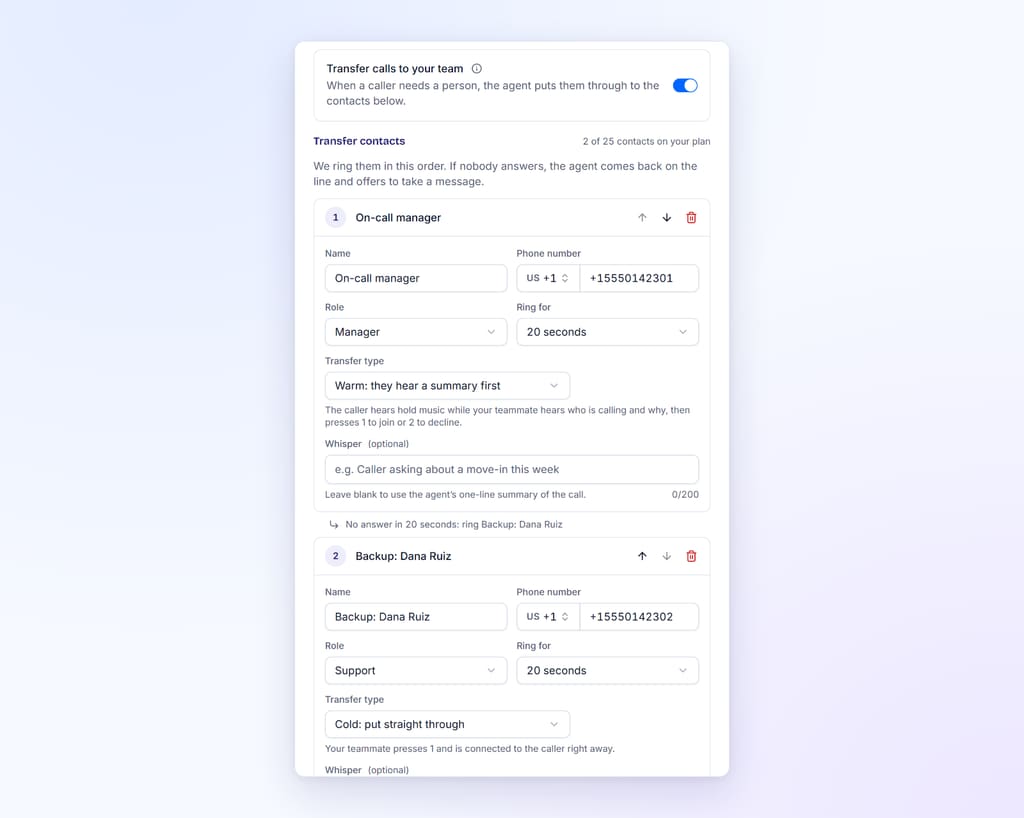
BookifyCall transfers calls to the contacts you add (the number depends on your plan). With warm transfer, the AI briefs your on-call person before connecting the caller, so they pick up knowing "tenant in unit 214, code rejected at the main gate, says they changed it last week." Add a backup contact in case the first one doesn't answer.
For fire, a break-in in progress or someone hurt, write a short line for the AI to say first: hang up and call 911. An AI receptionist answers your business line. It doesn't replace emergency services.
Payments, late fees and lien questions
BookifyCall doesn't take payments, and callers should hear that early. Tell the AI how tenants can pay (your online portal, the office, autopay) and to say it plainly when someone asks. Keeping card numbers off the phone is also good practice. The PCI Security Standards Council notes that recorded phone conversations may result in unnecessary storage of payment card data. Tell the AI to stop a caller who starts reading out a card number and point them to the right way to pay.
Late fees, overlocks and lien sales carry legal weight and real emotion, so they should reach a person. They will come to your number: Florida's self-storage lien statute, for example, requires the notice of a pending sale to include the owner's name, street address and telephone number. Tell the AI to take the tenant's name, unit and the best callback number, and to transfer during office hours if you prefer.
After-hours calls and the lot walk
If you'd rather answer yourself when you can, BookifyCall can ring up to five of your own phones first, in order, for 10 to 60 seconds each, optionally only during business hours. If nobody picks up, the AI answers and thanks the caller for holding. That suits a manager with a phone in their pocket on the lot: take the call if your hands are free, let the AI book the tour if they aren't. We cover the setup in ring your team first, then the AI.
After hours, the AI handles calls the same way: questions answered, tours booked, access problems transferred. Every call ends with a summary, transcript, recording and the caller's details, plus an email to you. Not sure how many calls you miss now? Our guide to what missed calls cost shows how to count them.
Example call walkthrough
This is a made-up call to a fictional facility, to show how the setup sounds.
AI: Thanks for calling Lakeside Storage, this is Riley. How can I help?
Caller: I'm moving out of a two-bedroom next weekend. What size do I need?
AI: A two-bedroom usually fits in a 10×15, or a 10×20 if you have a lot of furniture. Both come standard or climate-controlled. Do you have a preference?
Caller: Standard is fine. Can I see one Saturday?
AI: Saturday at 10:00 is open. Can I get your name and the best number for you?
(The caller gives their details.)
AI: You're booked for Saturday at 10:00 to see a standard 10×15. The office will confirm your unit when you arrive. The gate opens at 6 am and the office at 9.
Setting up an AI receptionist for self storage: a checklist
- Unit sizes, what fits, climate control and monthly rates in the business details
- Current specials with end dates, and a reminder to remove them
- Office hours in the hours settings; gate hours in the business details
- Your banned-items list and how tenants can pay
- A connected calendar with tour and move-in lengths
- An on-call transfer contact and a backup for lockouts and emergencies
- A 911 line for fire, break-ins and injuries
- No gate codes anywhere in the instructions
- A few test calls, then a week of reading summaries
The details for facilities, with a sample call and a sample day of bookings, are on our AI receptionist for self-storage page.
Frequently asked questions
Can it tell callers which units are vacant right now?
No. It answers from the sizes and details you give it and doesn't connect to storage management software. It books a tour or move-in appointment, and you confirm the exact unit.
Can it give tenants their gate code?
Only if you put codes in its instructions, and you shouldn't. Add an on-call transfer contact for lockouts and access problems instead.
Can it take rent payments over the phone?
No. It doesn't take payments. It can tell callers how to pay, take their details for the office, or transfer them to a person.
Does it work for an unstaffed or remotely managed facility?
It answers at any hour, books visits and transfers access problems to your on-call person. Someone still needs to be reachable for the calls it hands off.
Can I keep my facility's existing phone number?
Yes. You get a dedicated BookifyCall number, and you can forward your existing line to it, so the number on your sign and listings stays the same. Plans and limits are on the pricing page.
Start with sizes, prices, both sets of hours and one good on-call contact. Then listen to the first week of calls.