AI receptionist for law firms: intake calls without the legal advice
Aniket SinghIndustries8 min readUpdated

An AI receptionist for law firms answers intake calls while you're in court, with a client or closed for the night. It tells callers it's an AI, takes the facts your intake process needs, including the names your conflict check needs, and books a consultation into your calendar. It doesn't give legal advice, and urgent matters go straight to a person.
A friendly assistant that drifts into "you probably have a good case" creates real problems for a firm. This guide covers what the AI should and shouldn't say, how to hand intake details to the firm, and the ethics guidance worth reading first.
This is general information, not legal advice. Check your own jurisdiction's rules and your bar's guidance.
Key takeaways
- Have the AI say early in the call that it's an AI assistant, not a lawyer. Some bar guidance expects exactly that.
- Limit intake to facts: names, the other party, the type of matter, key dates and contact details. No advice, no predictions.
- Run your conflict check from the call summary, in your own system.
- Write a short list of urgent matters (an arrest, a hearing this week) and send those calls to a person.
- Limit who can see recordings and transcripts, and use two-factor sign-in.
Why law firm intake calls get missed
Lawyers spend much of the day where they can't answer a phone: hearings, depositions, client meetings. Small firms may have one person at the front desk. And people call a lawyer right after something goes wrong, often in the evening or at the weekend.
A caller with a fresh problem often keeps calling down the list until someone picks up. Voicemail tells them nothing, and a legal answering service usually takes a message. An AI receptionist can gather the facts and book the consultation during the call.
What the AI should and shouldn't say on law firm intake calls
The Florida Bar's Ethics Opinion 24-1 on generative AI is a useful guide here. It points to an earlier Florida opinion saying non-lawyers who conduct initial interviews must clearly identify their nonlawyer status, limit questions to obtaining factual information, and not offer any legal advice, and applies that thinking to AI intake. Your state may differ, but those three lines make a sensible brief for any intake assistant.
| The AI should | The AI should never |
|---|---|
| Say it's the firm's AI assistant, and answer truthfully if asked | Imply it's a lawyer or a member of staff |
| Ask for the caller's name, number and email | Say whether the caller has a case or what it's worth |
| Ask the type of matter in a sentence or two | Explain the law, deadlines or what the caller should do next |
| Ask who the other party is, for the conflict check | Say the firm will take the case |
| Ask about any court date or deadline | Quote fees you haven't written down |
| Book a consultation, or transfer an urgent call | Ask for the full story or for documents |
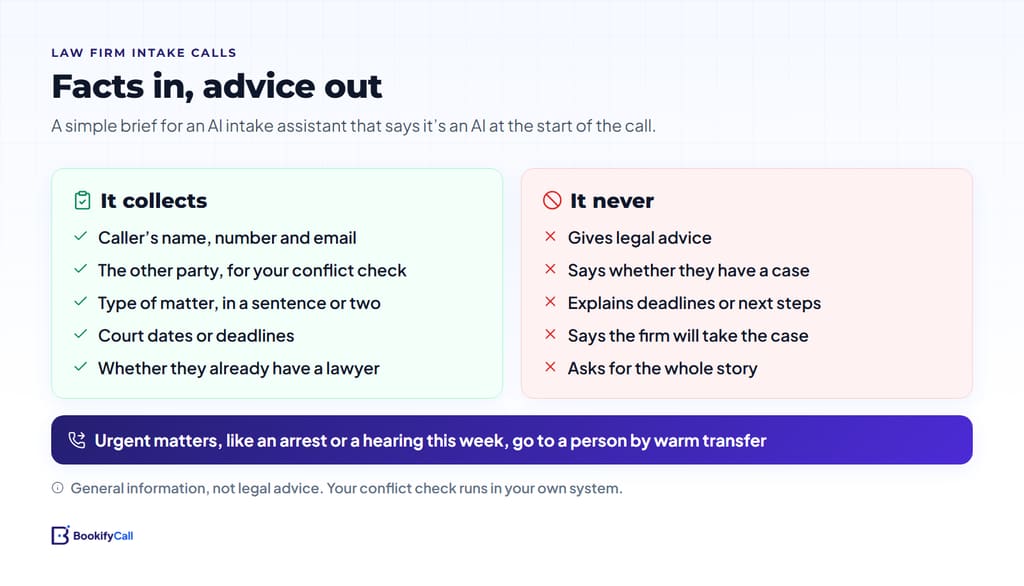
BookifyCall answers from the business details you give it and doesn't make up answers it wasn't given. Put the "never" list in those details in plain words, and give it a stock reply for legal questions: "I can't give legal advice, but I can set up a consultation with one of our attorneys." Our checklist on what to tell your AI receptionist has a section on things it must never say.
Tell callers it's an AI
The same Florida opinion is direct about chatbots: a lawyer must inform prospective clients that they are communicating with an AI program and not with a lawyer or law firm employee. It also warns against an "overly welcoming" chatbot that may give legal advice or fail to identify itself.
BookifyCall always tells the truth when a caller asks whether it's an AI. For a law firm, don't wait for the question. Tell the agent in its business details to introduce itself as the firm's AI assistant at the start of every call, and check with a few test calls. You name the agent, so avoid a name that matches someone on your staff.
Collect conflict-check details, then hand them to the firm
Information a prospective client shares can create duties for the firm even if you never take the matter. The ABA's Formal Opinion 510 on prospective-client conflicts, as summarized in the ABA Business Law Section's Business Law Today, suggests telling the prospective client the firm hasn't yet agreed to take the matter and limiting the information to what's needed to decide whether to proceed. An intake call should collect the minimum:
- The caller's name and contact details.
- The other party. The person or company on the other side, for your conflict check.
- The type of matter. One or two sentences, such as "a dispute with my landlord over a deposit."
- Dates that matter. A hearing, a filing deadline or a date they were served.
- Whether they already have a lawyer on this matter. The Florida opinion suggests screening questions for people who are already represented.
If the caller starts telling the whole story, the AI can say: "The attorney will go through the details with you at the consultation."
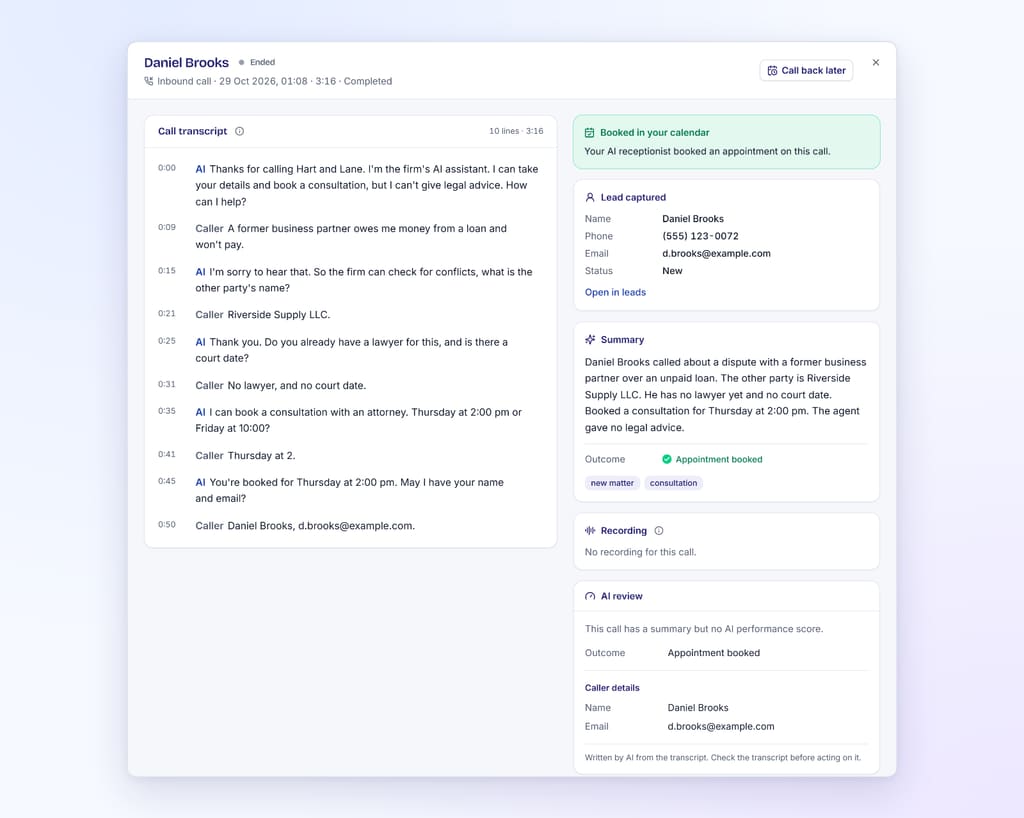
After each call you get a summary, transcript, recording and the captured lead. BookifyCall doesn't connect to practice-management or conflict-check software, so someone on your team runs the check from the summary in your own system, before the consultation.
Booking consultations into the calendar
BookifyCall checks your Google Calendar's real free and busy times during the call, offers open slots and books one. Calendly is supported too. For virtual consultations it can add a Google Meet link. A few habits help:
- Set consultation lengths and hours, so it only offers times you'd give.
- Say what the consultation costs, or that it's free, in your exact words. If you don't write it, the AI shouldn't quote it.
- Leave room for the conflict check. Ask the AI to say: "If anything comes up in our conflict check, we'll call you before then."
- List your practice areas. The AI can say politely that the firm doesn't handle a type of case, without advising on where to go.
The mechanics are in how AI phone booking works with Google Calendar and Calendly.
Urgent matters go to a person
Write a short urgent list: a family member was just arrested, a hearing tomorrow, a protective order, a deadline in days. Those calls should reach a lawyer, not a calendar.
BookifyCall transfers calls to the contacts you add (the number depends on your plan). With warm transfer, the AI briefs your colleague first, for example "caller's son was arrested tonight, arraignment expected tomorrow," then connects the caller. You can also have calls ring up to five of your own phones in order, for 10 to 60 seconds each, before the AI answers, and limit that to business hours. The set-up is in ring your team first, then the AI.
After hours
After hours, the AI answers the same way and transfers urgent calls to whoever is on call. If nobody is, tell it what to say instead, such as when the office reopens. For anyone in danger, give it a line telling the caller to hang up and call 911. It doesn't replace emergency services.
Recording, confidentiality and ethics guidance
Recording. BookifyCall records calls and can play a recording notice at the start. Consent rules vary by state and country; our guide to recording, disclosure and consent on AI calls covers the basics.
Confidentiality. Intake transcripts contain sensitive information. Give app access only to the people who need it, using team roles, and turn on two-factor sign-in. We don't make claims about privilege or about compliance with your jurisdiction's rules. That judgment belongs to you.
Ethics guidance. The ABA's Formal Opinion 512 (July 2024) on generative AI tools discusses lawyers' duties of competence, confidentiality, client communication, supervision and reasonable fees, as summarized in The Bar Examiner. Read it alongside your state bar's guidance before you go live.
Example intake call
A made-up call to a fictional firm:
AI: Thanks for calling Carter and Lane. This is Avery, the firm's AI assistant. How can I help?
Caller: I was rear-ended last week and the other driver's insurer keeps calling me. Do I have a case?
AI: I can't give legal advice, but I can book you a free consultation with one of our attorneys. Do you know the other driver's name, or their insurance company?
Caller: Mark Ellis. The insurer is Northway.
AI: Thank you. Is there a court date or deadline already?
Caller: No.
AI: Thursday at 2:00 is open, by phone or in the office. Which works for you?
The firm gets the caller's details, names for the conflict check and a booked slot, and no advice given.
Setting up an AI receptionist for law firms: a checklist
- AI disclosure at the start of every call, tested
- Practice areas you take and don't take
- The intake brief: contact details, other party, matter type, dates, existing lawyer
- The "never" list and a stock reply to legal questions
- Consultation types, lengths, hours and fees
- An urgent list and transfer contacts, with a backup
- Recording notice, team roles and two-factor sign-in
- Your bar's guidance on AI, reviewed
A sample intake call and a sample day of consultations are on our AI receptionist for law firms page.
Frequently asked questions
Will the AI give callers legal advice?
It shouldn't. It answers from the details you give it, and you tell it to collect facts, book consultations and refer legal questions to an attorney.
Can it run our conflict check?
No. It collects the names a conflict check needs, such as the caller and the other party, and puts them in the call summary. BookifyCall doesn't connect to practice-management or conflict-check software, so your team runs the check.
Does it tell callers it's an AI?
It always answers truthfully when asked. For a firm, tell it to introduce itself as an AI assistant at the start of the call, and check with a few test calls.
Can urgent calls reach an attorney at night?
Yes, if you add an on-call transfer contact. Calls on your urgent list are passed to that person, and with warm transfer the AI briefs them first.
Is it compliant with legal ethics or confidentiality rules?
We don't make that claim. Rules vary by jurisdiction, and whether a tool fits them is the firm's decision.
Start narrow: disclosure, a short intake brief and a clear urgent list, then read the first week of summaries. Plans are on the pricing page.