AI answering service for plumbers, HVAC and electricians
Aniket SinghIndustries10 min readUpdated

An AI answering service for plumbers, HVAC techs and electricians picks up while you're under a house, in an attic or off the clock. It sorts urgent calls from routine work using the rules you give it, puts the urgent ones through to whoever is on call, and books the routine jobs into your calendar with the address and the problem in the caller's words.
Most of the setup is deciding what counts as urgent for your shop. This playbook walks through that decision, the call types you'll actually get, and what to tell the AI so it handles them the way your best dispatcher would.
Key takeaways
- Write down your urgent list before anything else: active leaks, no heat in a freeze, burning smells, sparking panels. Everything else can usually be booked.
- Gas smells and electrical hazards get a safety script first and a transfer second. The AI is not a substitute for 911.
- Give the AI your service area, call-out fee and after-hours rate so callers hear the facts before anyone rolls a truck.
- Book arrival windows, not exact times, and keep drive time and an emergency slot blocked on the calendar.
- Review call summaries for the first couple of weeks and tighten the instructions where it hesitated.
Why an answering service for plumbers, HVAC techs and electricians matters
Contractor phones ring at the worst moments. You're soldering, holding a ladder, driving between jobs, or talking a homeowner through a quote. The US Bureau of Labor Statistics notes that plumbers work nights and weekends and are often on call to handle emergencies, and that HVAC technicians may be on call and sometimes work overtime or irregular schedules during peak heating and cooling seasons. Electricians' schedules, per the same handbook, may include evenings and weekends too.
So the calls come when you can't answer. A homeowner with water on the kitchen floor doesn't leave a voicemail and wait. They call the next company on the list. A homeowner who wants a quote on a new system might wait a day, but they'll book whoever calls back first.
Voicemail catches some of this. A live answering service catches more but often only takes messages. An AI receptionist sits in between: it answers right away, can answer questions from what you've told it, and can book or transfer during the call. If you're new to the idea, our guide on what an AI receptionist is and how it works covers the basics.
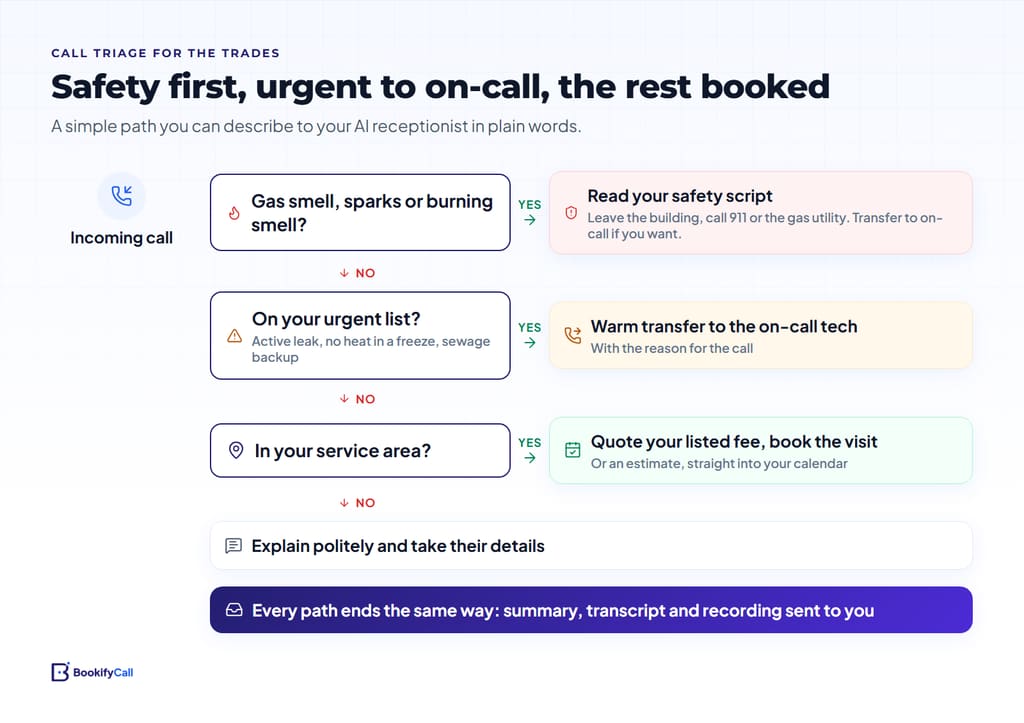
Urgent or routine: triage rules for contractor calls
The single most useful thing you can give an AI receptionist is a clear line between "put me through now" and "book it." Here's a starting point most plumbing, HVAC and electrical shops can adapt.
| Call type | What the AI does | When it hands off |
|---|---|---|
| Active leak, burst pipe, sewage backing up | Asks if they can shut off the water, takes the address | Right away, to the on-call tech |
| No heat in freezing weather, no cooling in extreme heat | Asks who's in the home (infants, elderly, medical needs) if you've told it to | Right away when it meets your urgent rules |
| Gas smell | Reads your safety script first: leave the home, call 911 or the gas utility from outside | Only after the safety message, if you choose |
| Burning smell, sparking outlet or panel, partial power loss | Reads your safety script, takes the address | Right away, to the on-call electrician |
| Noisy water heater, slow drain, running toilet | Quotes your call-out fee, books a visit | No, unless the caller asks for a person |
| Estimate for a remodel, new system, panel upgrade | Takes the scope, books an estimate visit | No |
| Seasonal tune-up or maintenance | Books into your maintenance slots | No |
| Outside your service area | Says so politely, early in the call | No |
| Billing question, warranty callback, complaint | Takes the details and the job address | During office hours, to the office |
Gas smells and electrical hazards: the safety message comes first
For a gas smell, the right first step is not a transfer. It's getting the caller out of the house. The US Pipeline and Hazardous Materials Safety Administration's guidance says to leave the area, avoid switches and flames, and call 911 from a location well away from the leak. Write your own version of that in plain words and tell the AI to say it before anything else.
Do the same for electrical hazards: stay away from the panel or outlet, don't touch anything wet near it, and call 911 if there's smoke or fire. An AI receptionist answers your business line. It doesn't replace emergency services, and your instructions should say so.
Emergency transfers to the on-call tech
Once a call is urgent, the AI's job is to get it to a person quickly with the facts attached. BookifyCall transfers calls to the contacts you add (the number depends on your plan), and with warm transfer the AI briefs your tech on why the person is calling before connecting them. Your tech picks up already knowing "active leak under the kitchen sink, water shut off, 14 Maple Court."
A few things that make this work in practice:
- Keep the on-call contact current. If your rotation changes weekly, updating the transfer contact belongs on the same checklist as handing over the on-call phone.
- Add a second contact. Techs miss calls too. A backup number (the owner, a lead tech) is cheap insurance.
- State your after-hours rate. If an after-hours visit costs more, have the AI say so before transferring. Some callers decide the dripping faucet can wait until morning at the standard rate, which saves your tech a wake-up.
- Ring people first during the day. BookifyCall can ring up to five of your own phones in order before the AI picks up. During office hours that keeps your dispatcher on the line; the AI only answers when nobody can. We cover this set-up in ring your team first, then the AI.
Service area, estimates and prices: what to tell the agent
The questions homeowners ask before booking are predictable. Answer them in the AI's business details and you'll filter out calls you'd never have taken anyway.
- Service area. Towns, ZIP codes or a radius, plus any areas you cover only for certain work. Out-of-area callers should hear it in the first minute, not after giving their whole history.
- Call-out or diagnostic fee. What it costs, what it includes, and whether it's credited toward the repair.
- What you quote by phone and what you don't. Fixed-price jobs (a toilet rebuild, a water heater flush) can be quoted. Anything that depends on what you find should become an estimate visit. Tell the AI not to guess.
- Estimates. Free or paid, how long the visit takes, and who needs to be home.
- Brands and systems. Which furnace, boiler, heat pump or panel brands you service, and which you don't.
- Licensing and insurance. A plain sentence the AI can repeat when asked.
- Financing or memberships. Only if you offer them, in your exact wording.
The AI answers from what you give it and doesn't make up answers it wasn't given. If a caller asks something you haven't covered, it can take a message or transfer. Our checklist on what to tell your AI receptionist goes deeper on structuring this.
Booking visits without wrecking your schedule
Booking is where an AI receptionist saves the most back-and-forth, and where a bad setup causes the most mess. BookifyCall checks your Google Calendar's real free and busy times during the call, offers open slots and books one. Calendly is supported too. A few trade-specific habits help:
- Book arrival windows. If you promise "between 8 and 10," make your service slots two hours long and name them as windows in the AI's instructions. Callers hear a window, not a promise of 8:00 sharp.
- Block drive time. Leave gaps between jobs on the calendar so the AI can't stack a 10:00 in one town and a 10:30 across the county.
- Hold an emergency slot. Many shops keep an afternoon block free for same-day calls. Put it on the calendar as busy, and release it yourself when the day's quiet.
- Capture access details. Gate codes, pets, which door, whether a tenant or the landlord is the contact. These come through in the call summary and transcript.
- Tenants and landlords. If you need the owner's approval before working on a rental, tell the AI to ask who owns the property and capture both numbers.
For the mechanics of calendar booking, see how AI phone booking works with Google Calendar and Calendly.
Example call walkthrough
This is a made-up example for a fictional HVAC company, to show how the triage rules sound on a real call.
AI: Thanks for calling Ridgeline Heating and Air, this is Casey. How can I help?
Caller: Our furnace stopped and it's 20 degrees out. My mom lives with us and she's 84.
AI: I'm sorry, that sounds cold. I'll treat this as urgent. What's the address?
Caller: 22 Linden Street.
AI: Thanks. Is the thermostat showing anything, or does it look blank?
Caller: It's on, set to 70, but nothing's coming out of the vents.
AI: Got it. Just so you know, after-hours visits have a $150 call-out fee. I'm going to connect you with our on-call technician now and let him know what's happening.
(The AI briefs the technician: no heat, 20 degrees outside, elderly resident, thermostat on, 22 Linden Street. Then it connects the caller.)
Compare that with a routine call the next morning: a homeowner asks for a spring AC tune-up. The AI quotes the tune-up price you listed, offers two open windows next week, confirms the name, address, number and email, and books it. Nobody on your team touched the phone.
Storm days, heat waves and other surges
The first hard freeze or the first 95-degree week brings a wave of calls at once. Two things help here.
First, decide what happens when all your lines are in use. BookifyCall lets you choose whether callers leave a message, get forwarded, or hold. On a surge day, a message with a callback is often kinder than a long hold.
Second, use scheduled callbacks for follow-ups you'd otherwise forget. You can schedule the AI to call a homeowner back at a set time with a reason, like "following up on the water heater estimate from Tuesday." If nobody answers, it retries on a schedule you choose, and it only calls during calling hours in the contact's local time (or your business time zone when their number doesn't show it, as with US numbers). Our post on follow-up calls, time zones and retries covers timing.
Where an AI answering service falls short for contractors
It's worth being clear about the limits before you forward your line.
- It can't diagnose. It can ask the questions you give it (is water still running, is the breaker tripped) but it shouldn't troubleshoot beyond your script.
- It books into your calendar, not your dispatch software. If you run jobs from field service software, bookings land in Google Calendar or Calendly and someone moves them over.
- It doesn't take payments. Deposits and card details stay with your office.
- Some callers want a person. Ring-first and transfers handle that. If a caller asks whether they're talking to an AI, it tells the truth.
For a side-by-side look at the alternatives, see AI receptionist vs answering service vs voicemail. The details for trades specifically are on our AI receptionist for home services page.
Frequently asked questions
Is an AI answering service a good fit for a one-truck plumbing business?
Often, yes. Solo owners are the ones most likely to be on a job when the phone rings. Set it to ring your cell first, then let the AI answer, book routine work and transfer emergencies back to you. Plans and limits are on the pricing page.
How does the AI know a call is an emergency?
From the rules you write. Describe what counts as urgent for your shop, such as active leaks, no heat below a certain temperature, or burning smells, and add an on-call transfer contact. Calls that match are passed to that person with the reason.
Can it quote prices for repairs?
It quotes the prices you list, such as call-out fees, tune-ups and fixed-price jobs. For work that depends on what the tech finds, tell it to book an estimate visit instead of guessing.
Can I keep my existing business number?
Yes. You get a dedicated BookifyCall number, and you can forward your existing line to it, so the number on your trucks and yard signs stays the same.
Can it handle callers who speak Spanish?
Multi-language calls are available on the Pro and Enterprise plans. Test it with a few practice calls in each language before you rely on it.
What do I get after a call?
A summary, the full transcript, a recording, the caller's details and the outcome, with an email notification. Reading these for the first couple of weeks is the fastest way to tune your instructions.
The best set-up for a trade business is the simplest one you trust: a short urgent list, a current on-call contact, honest prices and a calendar with room to breathe. Start there, listen to a few calls, and adjust.